
Turn features on or off
Choose which modules your daycare uses under Settings → Features. Turning one off hides it for everyone but keeps your data.
NestliCare has more features than any one daycare needs. Turn off the ones you don't use to keep things simple for your team. Go to Settings → Features, in the Features & Modules section.
Only owners can change these. Center admins don't see the Features tab. In the app, owners find most of the same switches under Admin → Settings, in Standard Features and Advanced Features.
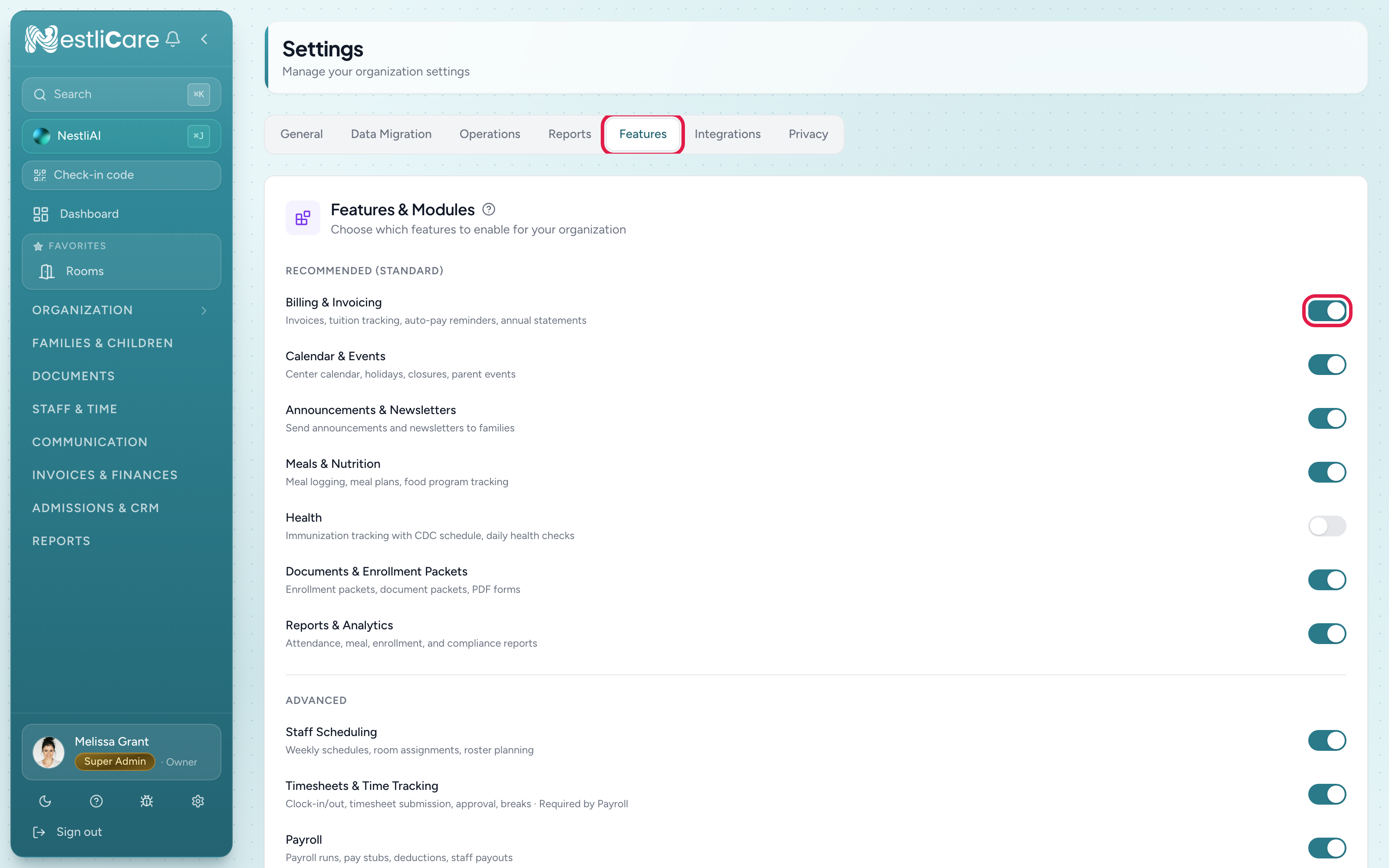
Recommended (Standard) modules
These are on by default and fit most daycares:
- Billing & Invoicing
- Calendar & Events
- Announcements & Newsletters
- Meals & Nutrition
- Health: immunization tracking and daily health checks
- Documents & Enrollment Packets
- Reports & Analytics
Advanced modules
- Staff Scheduling: on by default
- Timesheets & Time Tracking: on by default
- Payroll: off by default. When it's on, a Payroll mode picker appears under it. CSV Export downloads approved hours for your payroll provider. See Set up payroll.
- Admissions: on by default. Your lead pipeline, tasks and follow-ups. (The app calls this switch Leads / CRM.)
- Staff Documents: off by default
Other switches on this tab
These aren't modules. They're extra options, off by default, and only on the web:
- Half-day sessions: mark a child as mornings only or afternoons only, so two children can share one spot in a day.
- Name-to-face reminders: remind a room's clocked-in staff when no name-to-face check has been saved for a while. Choose the interval in Remind after.
- Meal logging reminders: nudge a room's staff when a meal on today's published menu hasn't been logged by its usual time.
- AI features: shows only if NestliCare has turned AI features on for you. Turning it off stops them for everyone at your organization.
Timesheets and Payroll go together
- Turning Payroll on also turns Timesheets & Time Tracking on.
- Turning Timesheets & Time Tracking off also turns Payroll off.
A common setup
A home daycare with one provider usually turns off Staff Scheduling, Timesheets, Payroll, and Staff Documents, and keeps Billing, Calendar, Announcements, Documents, and Reports. A multi-site center typically leaves everything on.
Troubleshooting
I don't see the Features tab. It's for owners only. Center admins see General, Reports and Privacy.
I turned a module off but staff still see it. Ask them to refresh (reload on web, reopen the app on mobile). The change applies on their next load.
Payroll turned off by itself. Someone turned Timesheets off, which also turns Payroll off. Turn Payroll back on and Timesheets comes back with it.