
Share a pickup code with a family member
See, share, and reset the pickup codes of the family members you've added — so a grandparent or babysitter can collect your child without installing the app.
A family member doesn't need the app to pick up your child. So if they'd rather not install one, they don't have to.
Every family member you add gets their own 4-digit pickup code, and it always works at the kiosk. Read it from your app, pass it along once, and they're set: same code every day, drop-off and pickup alike.
See your family members' codes
- Open the Me tab.
- Scroll to Family and tap Family Pickup Codes.
- Each family member is listed with their code.
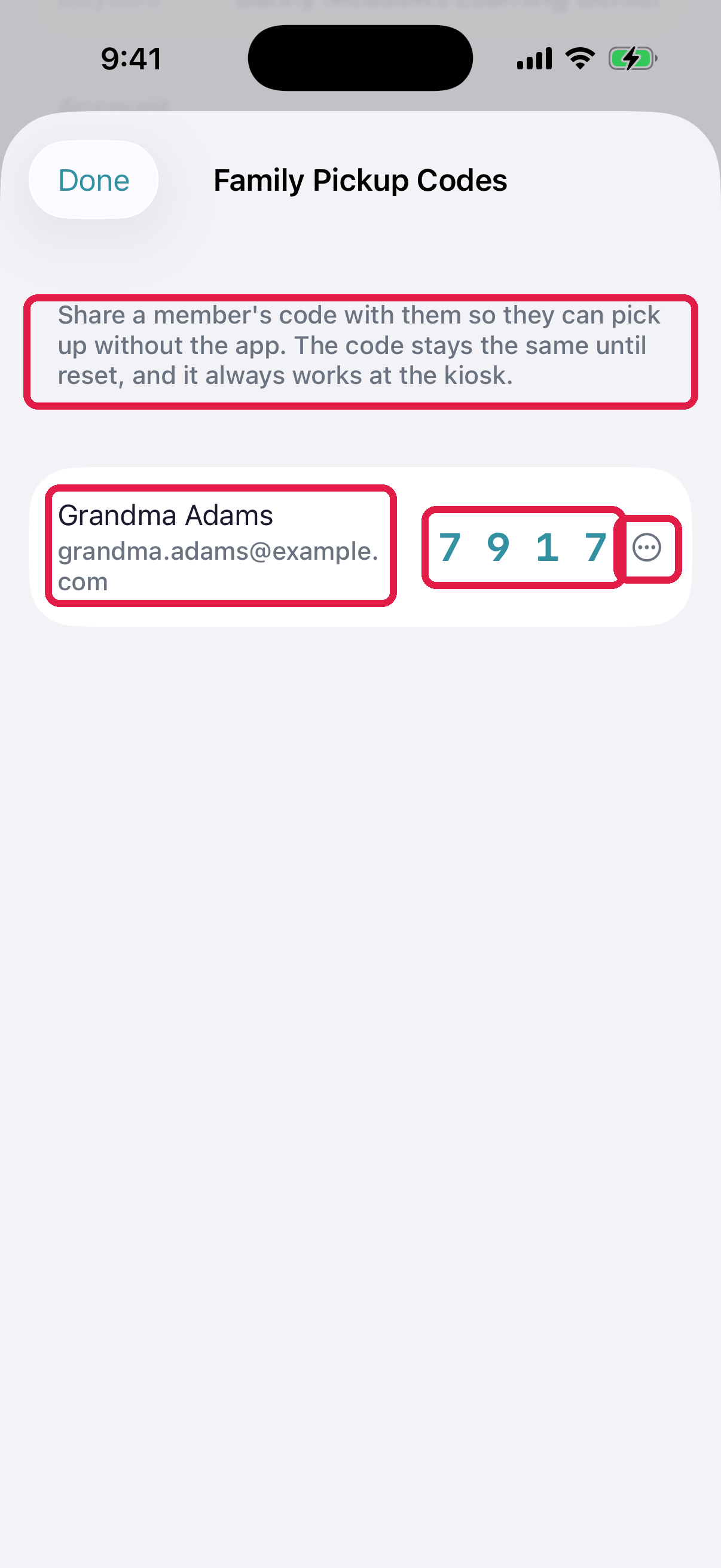
- 1Explainer — the code stays the same until reset, and always works at the kiosk
- 2Family member name and email
- 3Their 4-digit pickup code
- 4Copy, share, or reset this member's code
On iPhone, tap ⋯ next to the person, then Copy code or Share code. On Android, tap the copy or share button next to their code. Share sends it through any app on your phone.
What to tell them
Something like:
Your pickup code at the daycare is 4-8-2-1. Type it on the tablet by the door when you drop off or pick up Liam. It's always the same code.
That's the whole thing they need to know.
Reset a code
If a code has spread further than you'd like — a group chat, an ex-partner, someone who no longer helps with pickups — reset it.
- Open Family Pickup Codes.
- On iPhone, tap ⋯ next to the person, then Reset code. On Android, tap the reset button next to their code.
- Confirm.
- A new code appears. Send them the new one.
The old code stops working at the kiosk immediately.
If they do have the app
Nothing changes for you. They'll see the same code on the YOUR PICKUP CODE banner at the top of their Dashboard tab. You can still see and reset it from your side.
See Use your pickup code — that's the article to send them.
Troubleshooting
No one is listed. You haven't added any family members yet. Me → Add Family Member first — see Add a pickup contact.
A code is still loading. Pull down or close and reopen the screen. Codes generate the first time they're viewed.
Only some family members appear. This screen lists the family members you added. Everyone else, like a co-parent, keeps their own code private and manages it from their own app.
They typed the code and the kiosk refused it. Almost always a mistype — codes don't rotate. If it keeps failing, the code was probably reset since they learned it; check the current one on this screen.
"Couldn't reset the code." You can reset up to 5 times an hour. If you're past that, wait, or ask the daycare to reset it for you.