
Pay an invoice
Pay a tuition invoice in the NestliCare app with a card or bank account, and set up auto-pay so you never think about it again.
When your daycare generates an invoice, you'll get an email and an in-app notification. You can pay it from the email, from the app, or from the web.
Short version first: this narrated video saves a card and pays an invoice in the app.
About the invoice email
When your daycare sends an invoice, your family's billing contact gets an email with the subject "Invoice #… from [your daycare's name]". It shows the amount and due date, and it has a View Invoice button.
That button shows you the invoice. It is not a payment link. You always pay in the app, using the steps below.
Pay from the app
- Open the Dashboard tab.
- Scroll to Payments.
- Find the unpaid invoice and tap Pay Now.
- The Pay Invoice screen shows the total, including the fee if you pay it.
- Tap Continue to payment.
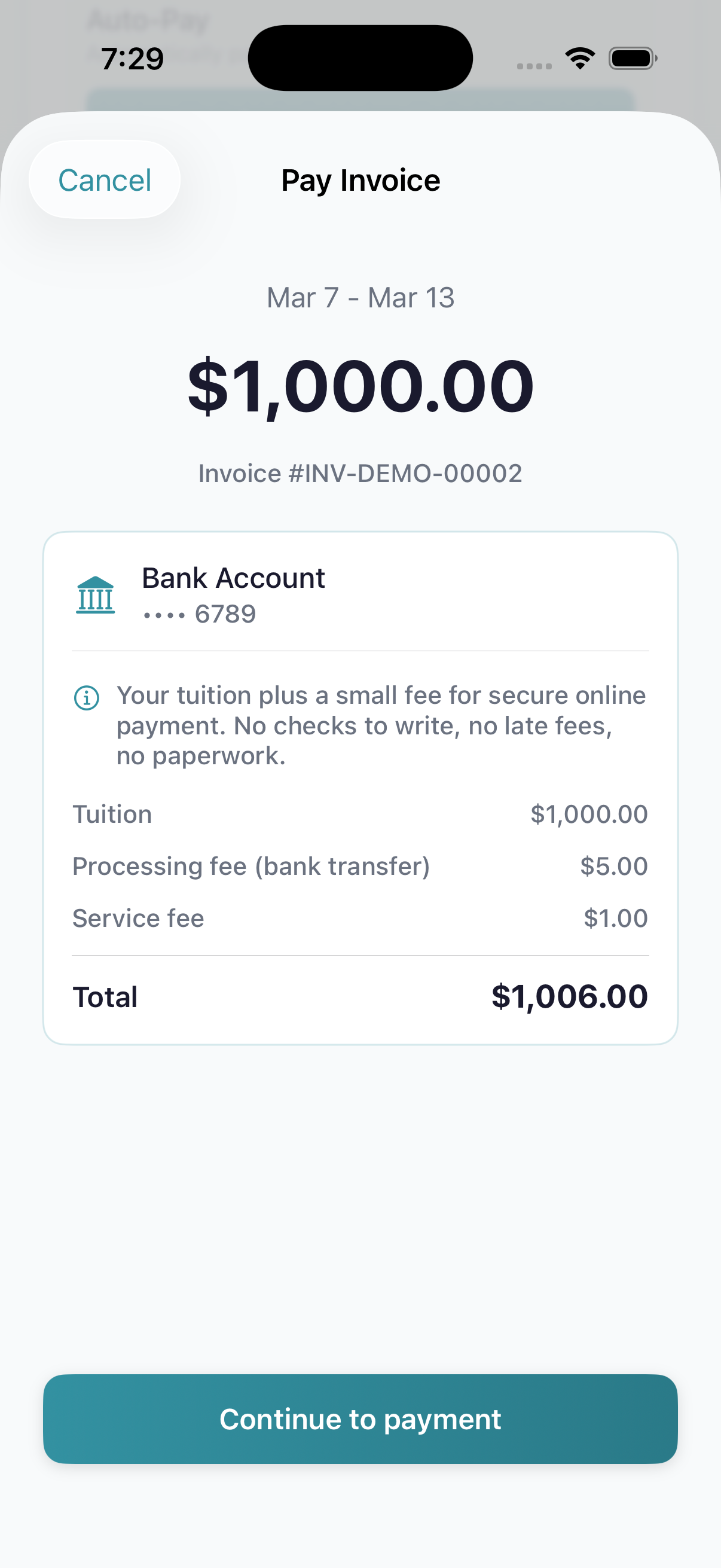
- 1Pay Invoice — the invoice period sits at the top
- 2Total amount due with the invoice number underneath
- 3Connected bank account (or card) used for payment
- 4Fee breakdown — your tuition plus the daycare's processing + service fees
- 5Continue to payment — opens the secure Stripe sheet
- A secure payment sheet opens. Pick your saved method (or add one), then tap Pay.
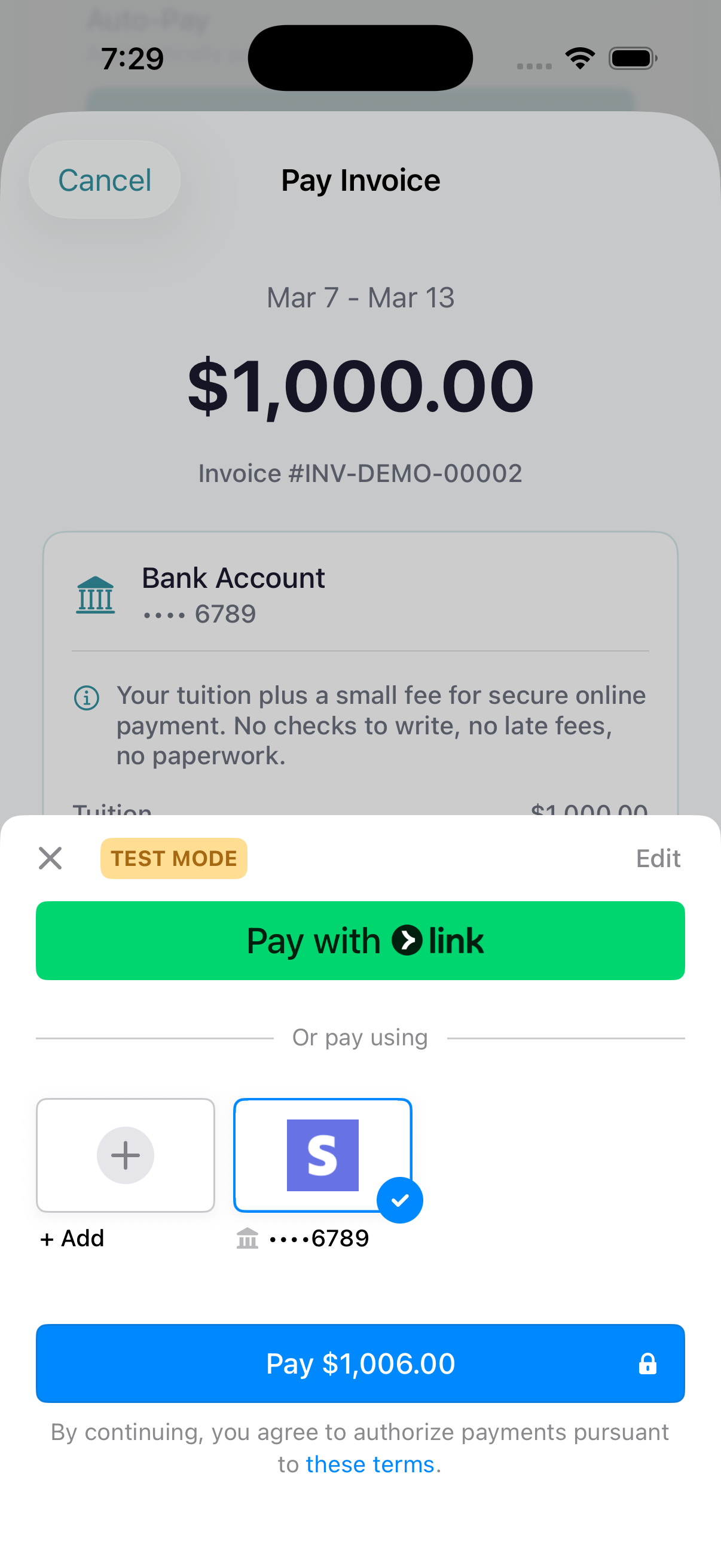
- 1Pay with Link — if you have a Stripe Link account, this is the one-tap option
- 2Saved bank account — tap to select, then hit Pay
- 3Pay button — charges the amount shown including fees
Pay part of an invoice
Your daycare can let you pay an invoice in parts. When they have, the pay screen asks how much you'd like to pay: the full balance, or a different amount from $5 up to what's left. The fee is worked out on the amount you choose. Whatever you don't pay stays on the invoice for next time. If you don't see the choice, the invoice is set to be paid in full; ask your daycare if you need to split it. On a phone, update the NestliCare app to see this option.
Card vs. bank account (ACH)
- Card: paid right away. The fee is usually 2.9% + $0.50 (2.9% + C$0.50 in Canada).
- US bank account (ACH): takes 3 to 5 business days to clear. The fee is usually 1%, up to $6. On big tuition bills, that's much cheaper.
Your daycare decides whether you pay the fee or they do. The exact fee always shows before you pay.
What "$150.00 + $4.79 fee" on a paid invoice means
If your daycare passes the convenience fee on to you, the invoice detail page shows the total you actually paid as two parts:
Paid $150.00 + $4.79 fee
The first number is the tuition (matches the invoice Total). The second is the convenience fee you agreed to cover at checkout, the same kind of fee you'd see on most online checkouts. Together they're the gross amount your bank or card statement will show. This is normal: you didn't overpay, the breakdown is just split out so the tuition portion is easy to read.
If you don't see "+ fee" on a paid invoice, your daycare absorbed the convenience fee instead of passing it to you.
Set up auto-pay
To stop worrying about invoices:
- Save a payment method first. See Add your payment method.
- Open Me → Payment Method, and tap Enable Auto-Pay.
- Pick when to charge: Same day, 1 day after, 3 days after or 1 week after your daycare sends the invoice.
Pick a later option if you want time to check each invoice first. You can turn auto-pay off any time. See Update your payment method.
Payment records
Paid invoices show Paid in your invoice list. Open one to see what you paid.
Need a record for taxes or your employer? Download your annual payment statement:
- iPhone: Me → Payment statement → pick the year → Download statement.
- Android: Me → Download annual statement.
- Web: Payments → Annual statements.
It covers the whole year, including cash and check payments your daycare recorded. There is no separate receipt email or receipt download for each payment.
Troubleshooting
"Your card was declined." The card was blocked by your bank. Contact them, or try a different card. We can't override a decline.
"This invoice has already been paid." Another parent in your family paid it, or auto-pay did. Pull down to refresh your invoices.
You were charged but the invoice still says unpaid. Payments take up to a minute to land. If it still says unpaid after 5 minutes, message your daycare. Don't pay again.