
View your tuition history
See every invoice, past and present — with filters by status and full payment detail per invoice.
Every invoice your daycare has ever sent you lives in the app. You can filter by status, open any one to see the line items, and pay anything unpaid.
Open your invoice list
- Open the Dashboard tab.
- Scroll to Payments (called Billing if your daycare doesn't take online payments) and tap View All. Every invoice is listed, newest first.
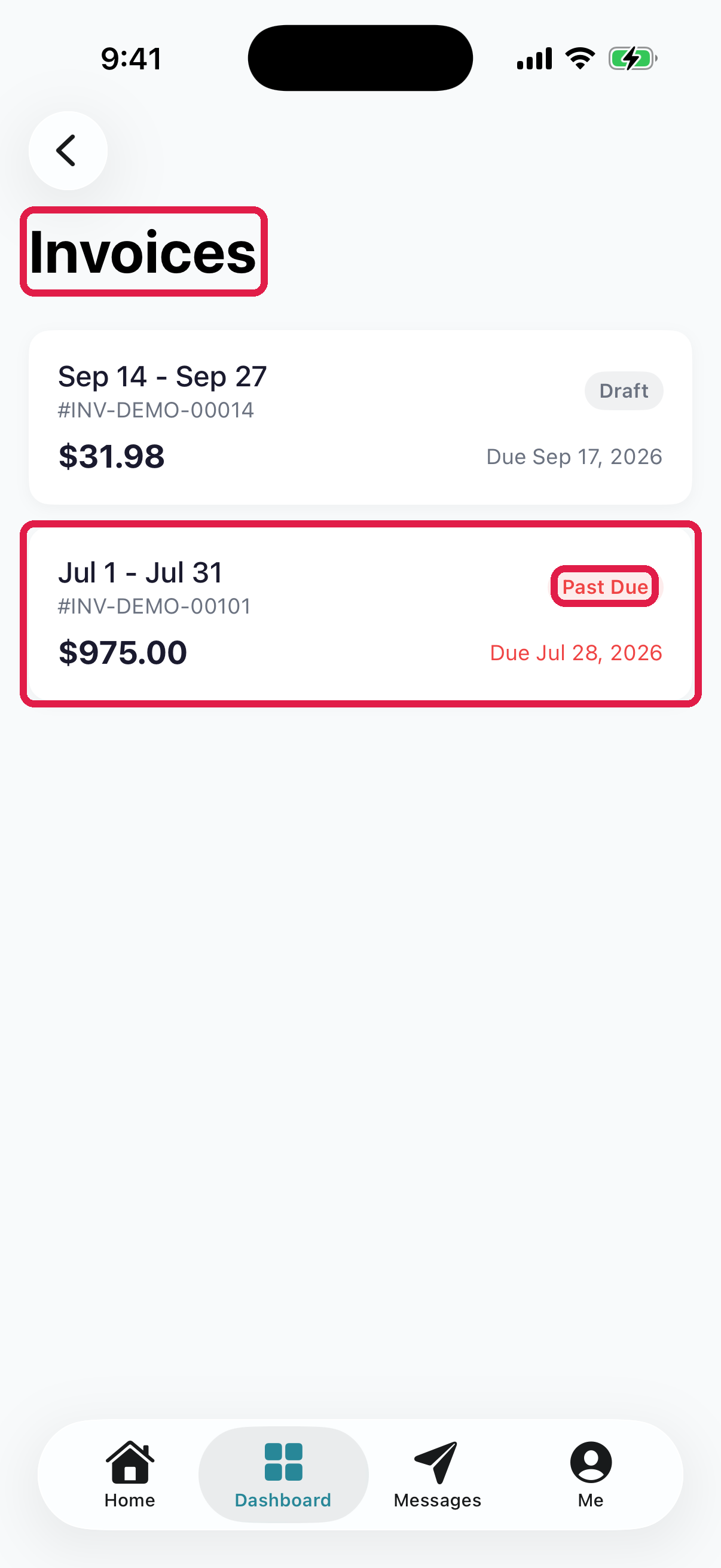
- 1Invoices heading
- 2Per-invoice card — period, invoice number, total amount, and due date. Tap it to open the invoice
- 3Status badge — Draft, Sent, Paid, or Past Due
Filter by status
If your daycare takes online payments through NestliCare, the list opens on the Payments screen, which has a Filter dropdown at the top of the list to narrow it:
- All — everything
- Unpaid — invoices owing something (sent but not yet paid)
- Paid — fully settled invoices
- Past Due — invoices where the due date has passed
For tax time, use your annual payment statement (see below). If your daycare doesn't take online payments, there's no filter: the list simply shows everything, and the status badge on each card tells you where it stands.
Open an invoice for details
Tap any invoice to see:
- Total amount due (at the top, bold)
- Period it covers (e.g., "January 2026")
- Due date — in red if it's past due
- Line items — each charge with description, quantity, and amount
- Subtotal / Discount / Tax / Total — the breakdown
- Paid — if a partial payment has been made, the amount and remaining balance
- Notes — any custom message from your daycare
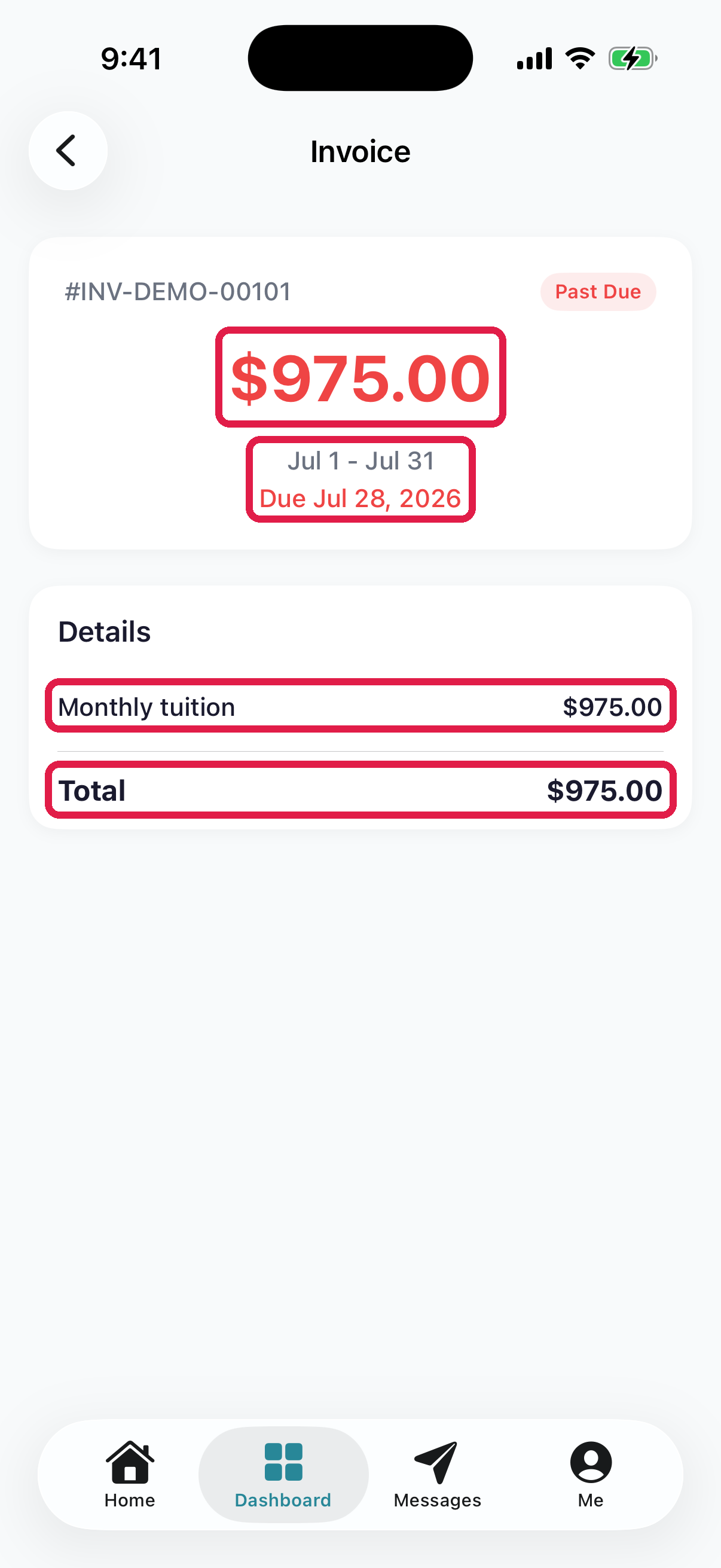
- 1Amount due — large at the top, with the invoice number and status pill above it
- 2Period and due date
- 3Line items — description and amount per row
- 4Total. Once your daycare has online payments set up, a Pay Now button appears below it, red if overdue and teal if current
If your care is charged by the hour
Some daycares bill before and after school care by the hour rather than a flat rate. If yours does, the amount changes from one period to the next, and the line item shows the maths:
Maya — Before & after school (After School) — Week of Aug 2 — 12.5 hr @ $10/hr
The hours come from the times your child was signed in and out. Those invoices arrive after the period they cover, so a weekly one lands at the start of the following week.
If the hours don't look right, message your daycare — they can correct the check-in or check-out record and recalculate the invoice before you pay.
Pay from the detail view
If there's an amount owing and you have a payment method on file, the Pay Now button is visible at the bottom of the detail page. Tap it to pay — see Pay an invoice for the full flow.
If no payment method is linked yet, Pay Now is hidden. Go to Me → Payment Method to add one — see Update your payment method.
What's NOT in the invoice list
- Receipts for each payment. There's no receipt download or receipt email. Use the annual statement below.
- Future invoices. Only invoices your daycare has already made show here.
Download your annual payment statement
- iPhone: Me → Payment statement → pick the year → Download statement.
- Android: Me → Download annual statement.
- Web: Payments → Annual statements.
It covers the whole year, including cash and check payments your daycare recorded. There is no separate receipt email or receipt download for each payment.
Who gets invoice emails
Everyone in your family sees invoices and payment history in the app and gets the in-app notification. Invoice emails go to one person, your family's billing contact. That's your family's first adult unless your daycare has moved it to someone else. Ask your daycare if invoice emails should go to a different person.
Troubleshooting
Invoice list is empty. You have no invoices yet. This is common for newly enrolled families before the first billing cycle.
Invoice shows "Paid" but I never paid. Auto-pay may have charged it (check Auto-Pay on the Me tab). Or your daycare recorded a cash or check payment, or used a credit on your account. Ask them if you're not sure.
Pay Now is missing on an unpaid invoice. No payment method linked. Me → Payment Method → Add Payment Method.
Total doesn't match what my daycare told me. Check the Discount and Tax lines in the totals breakdown — there may be line items that explain the difference. If still mismatched, message your daycare.
I paid but the status still says Unpaid. Payment can take a minute to settle. Pull to refresh the invoice list. If it's been more than 5 minutes, message your daycare — they'll look at the transaction from their side.
I need a receipt. Download your annual payment statement (see above). For one payment, ask your daycare.