
Post an announcement
Send a short notice to all families, one center, or chosen rooms, with photos or PDFs. It shows in the parent app with a notification.
An announcement is a short notice that goes to parents in the app, with a notification. Use it for time-sensitive things: a closure, a reminder, an event. For a longer formatted update sent as email, use a newsletter instead. Not sure which? See Announcement, newsletter, message, or feed?.
Post one
- Go to Communication → Announcements.
- Click New Announcement.
- Fill in the form:
- Title (required)
- Content (required)
- Photos (optional): up to 4, added with Add photo (JPEG, PNG, WebP or HEIC, up to 10 MB each).
- Documents (optional): up to 2 PDFs, added with Attach PDF. Handy for a flyer or a new rate sheet.
- Audience: All Parents, By Center, or By Room.
- Priority: Normal or Urgent.
- Pin this announcement: keeps it at the top of parents' feeds for 24 hours after you publish, then it falls into normal order.
- Click Publish to send it now, or Save as Draft to finish later.
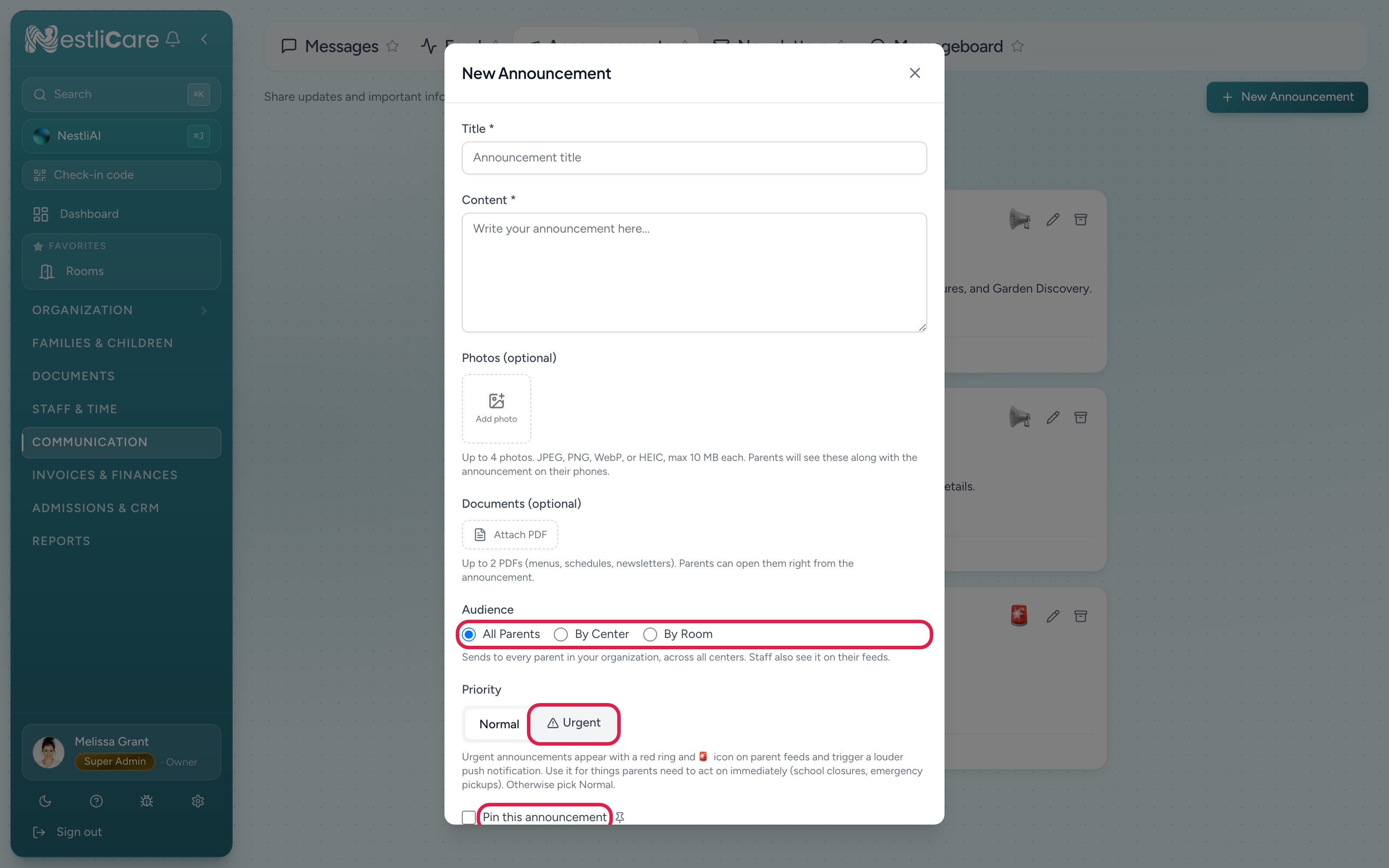
Audience
- All Parents: every family in your organization.
- By Center: only families at the centers you pick (for multi-site).
- By Room: only families with a child in the rooms you pick.
Staff at those centers or rooms see it too.
Teachers can post too
Teachers can post announcements, but only to rooms they pick (By Room is their only audience). If a teacher is still in training, what they publish waits under Waiting for approval until an admin publishes it.
Manage what you've posted
The Announcements page has Active, Waiting for approval, Drafts, and Archived tabs. Edit, archive or delete an announcement from its row. Archiving removes it from parents' feeds while keeping a record in the Archived tab.
Editing a published announcement and clicking Save changes doesn't send a new notification or move it back to the top.
See who liked it
Published announcements show a heart and a comment count. Click the number next to the heart to open the list of everyone who liked it. Clicking the heart itself likes or unlikes it for you. In the NestliCare app, tap the number next to the heart on the announcement card in your feed.
The like count only shows on Active announcements. Drafts and archived ones don't show likes.
Troubleshooting
A parent can't find an announcement. Check the Active tab and confirm the audience includes them. If it's under Archived, someone archived it.
I need to take one down now. Open it in Active and archive it. It clears from parent feeds right away.
I fixed a typo but parents weren't notified again. That's on purpose. Saving changes to a published announcement doesn't re-send it. If the change matters, post a new announcement.