
Bill drop-in families a daily rate
Charge a flat rate for each day a child attends, with nothing billed for the days they don't — the usual arrangement for drop-in and casual care.
Drop-in families don't fit a weekly or monthly plan. They come when they need you — twice one week, not at all the next — and they expect to pay a day rate for the days they actually came. A daily rate plan does exactly that: one flat charge for every day the child attended, and nothing for the days they didn't.
Where to find it
There's no separate "daily" billing interval, and looking for one is the usual reason people don't find this. A day rate lives inside the attendance-billed plan type, because it works the same way underneath: NestliCare reads the days your staff checked the child in and out, then prices them. The only difference is what it charges per day.
So the path is Plan Type: Hourly, by attendance, then Rate is: Per day.
Create the plan
- Go to Invoices & Finances → Billing → Billing Plans.
- Click Create Plan.
- Name it something the parent will recognise on an invoice, like
Drop-in day rate. - Under Plan Type, choose Hourly, by attendance.
- Under Rate is, choose Per day.
- Fill in:
- Rate per day (required) — what one day of care costs, e.g. $45.00.
- Invoiced (required) — how often to send the bill: Weekly, Bi-weekly, or Monthly. This is only how often the invoice goes out; it never changes the rate.
- Click Create Plan.
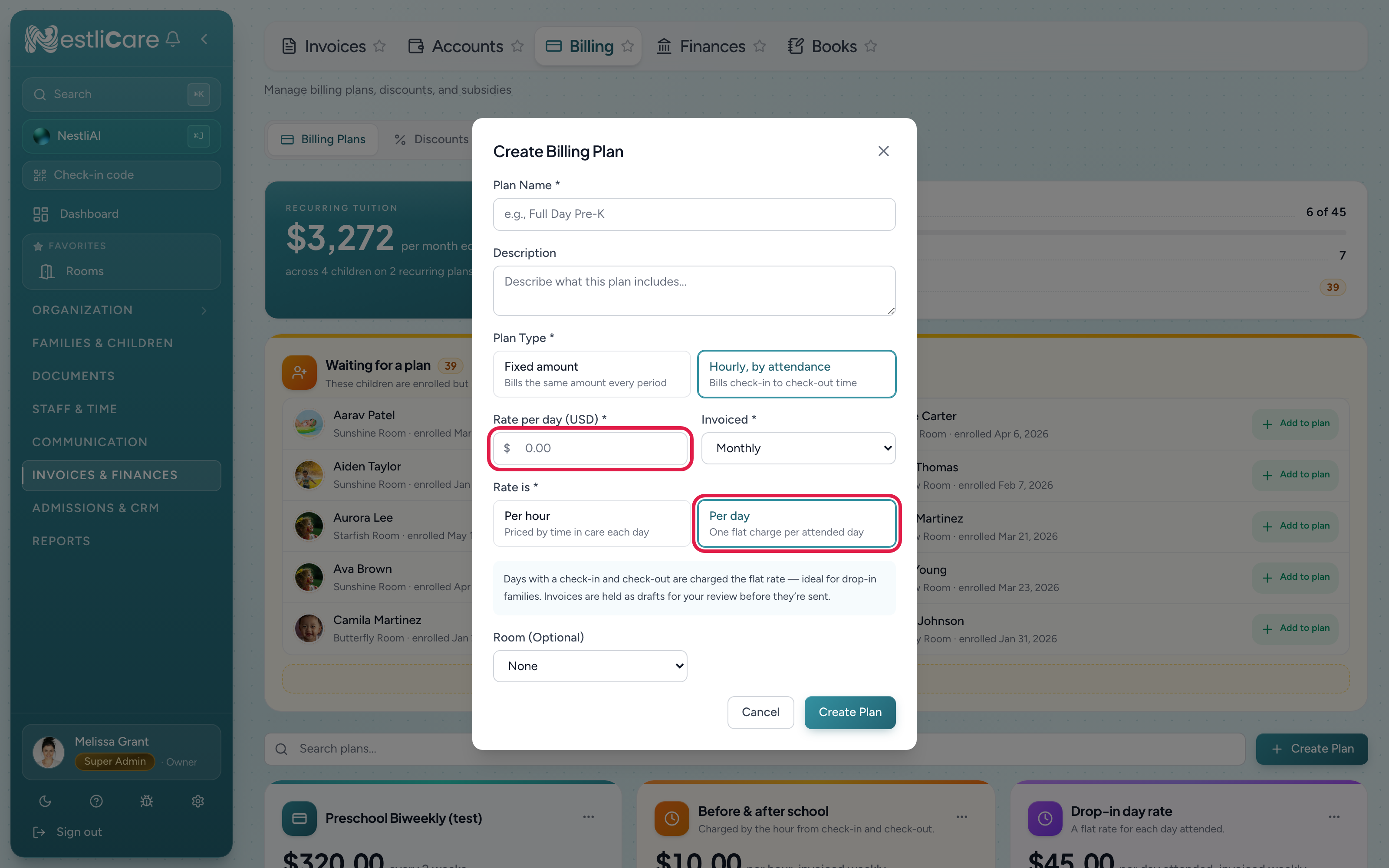
The plan card shows the rate as $45.00 per day attended, invoiced weekly with a by attendance badge, so it's obvious at a glance which of your plans are driven by real attendance.
Attach it to a child
A plan bills nobody until it's on a child's enrollment:
- A child who's already enrolled: open the child's profile, go to the Details tab, and in the Enrollment section set the Billing plan row.
- A child you're enrolling now: on a room card under Organization → Rooms, click Enroll child and pick the plan under Tuition plan (optional). The Add Child and Add Family forms also offer a tuition plan once you pick a room.
The plan shows as $45/day, and you can do this from the iOS and Android apps too.
Daily plans attach to a child's room enrollment. They can't go on an add-on program — program fees aren't driven by check-in and check-out, so use a fixed plan there.
What gets billed
When the period ends, NestliCare walks the days that child attended:
- Every day with a check-in and a check-out is charged the full rate.
- How long they stayed makes no difference, unless you've set a short-day rate (below). Half an hour and nine hours are both one day at $45. That's the point of a day rate.
- Days the child was absent add nothing.
- If they attended nothing at all in the period, no invoice is created for it.
The invoice line names the number of days and the rate, and each day is listed underneath with the hours the child was actually there, so a parent asking "what am I paying for?" gets a straight answer:
Maya Okafor — Drop-in day rate (Preschool Grove) — Week of Aug 2 — 2 days @ $45/day
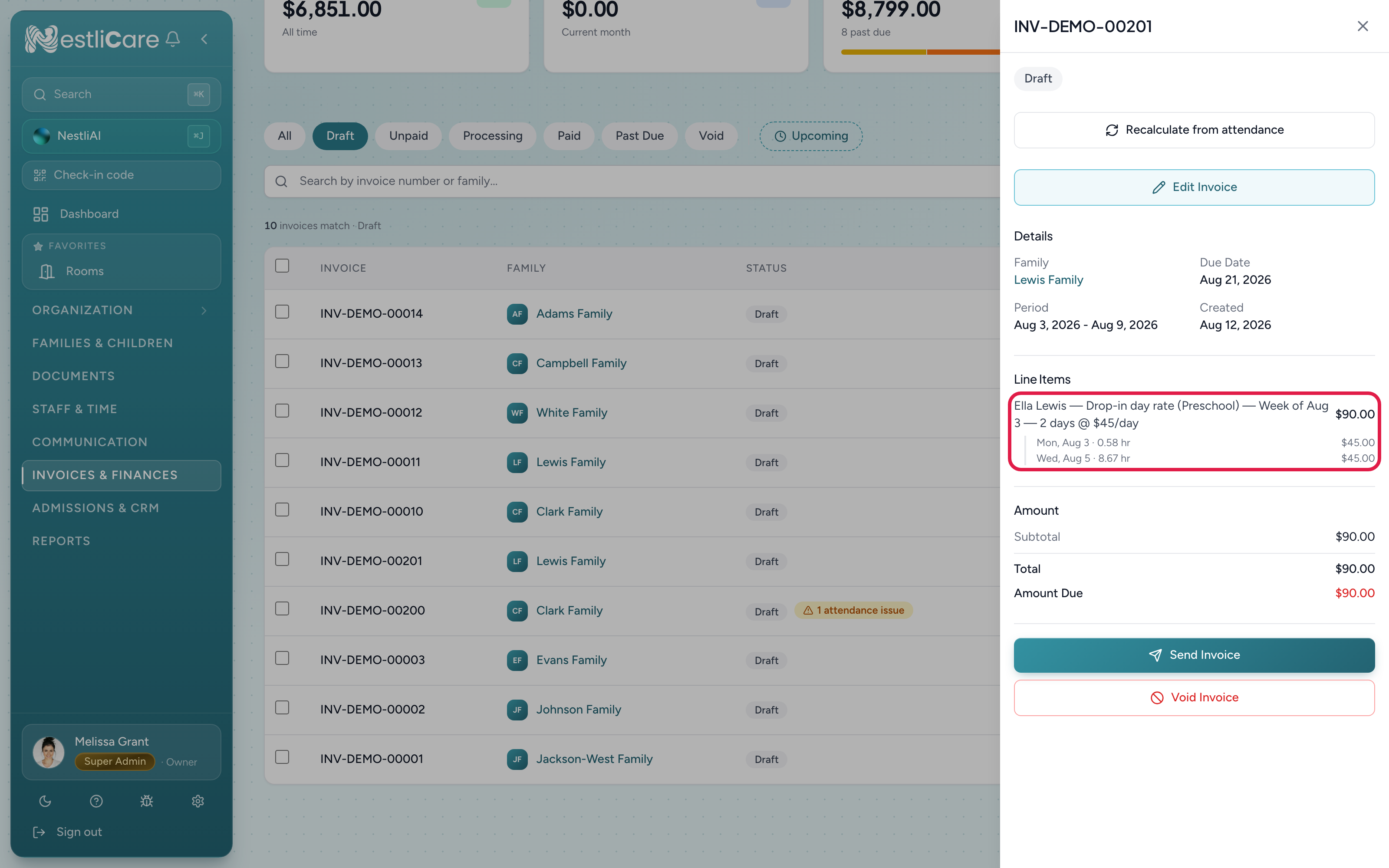
Sibling discounts and subsidies apply exactly as they do on any other plan, after the days are priced.
Charge less for short days
Some families do both: a few hours' drop-off on some mornings, a full day on others. You don't need two plans for that. One daily plan can carry two rates, and the check-in and check-out times decide which one each day gets.
- Open the plan (or create one) with Rate is: Per day.
- Tick Lower rate for short days.
- Fill in:
- Full-day rate — what a full day costs, e.g. $55.00. This is the plan's normal rate.
- Short-day rate — what a short day costs, e.g. $25.00. It has to be less than the full-day rate.
- Short day is up to (hours) — the longest a stay can be and still count as short, e.g. 5. A day of exactly 5 hours is short. A day of 5 hours and 1 minute is a full day.
- Save.
When you create a plan on the spot while attaching it to a child (or from the iOS and Android apps), the same choice appears as an optional Short-day rate next to the day rate.
The plan card then reads $55.00 per day attended, $25.00 for 5 hours or less, invoiced weekly. The invoice line counts each kind of day separately:
Maya Okafor — Drop-in and full day (Preschool Grove) — Week of Sep 28 — 2 short days @ $25 + 1 full day @ $55
Each day is still listed underneath with the real hours, so the parent can see why a day was short or full.
A few things to know:
- The rate is picked per day, not per week. A week with two drop-offs and one full day is billed as exactly that.
- A missing check-out still bills $0, not the short rate. Fix the check-out, then Recalculate from attendance.
- Each child needs their own plan if their rates differ. If siblings pay different amounts, give each child a plan with their own two rates.
- To turn it off, untick Lower rate for short days and save. Every day goes back to the one flat rate. Invoices already generated keep their amounts.
Review before sending
Daily invoices are always created as drafts, even when Auto-Send is on for the rest of your billing. Real money is coming out of attendance records, so a person looks first.
If a day has an attendance problem the draft is flagged, and one case is worth understanding clearly:
A day with no check-out is billed at $0, not the day rate. If a teacher forgot to sign a child out, NestliCare doesn't guess the charge — it bills nothing for that day and tells you why, so the invoice is visibly short rather than quietly wrong. Fix the check-out on the child's attendance (Fix an attendance mistake), then open the draft and click Recalculate from attendance. The day picks up its $45 and the flag clears.
A day NestliCare auto-closed for you (check-in recorded, check-out inferred at your usual closing time) is charged the full rate — the child was there, and with a day rate the exact departure time doesn't change the price. It's still flagged so you can confirm.
When invoices are generated
Daily plans bill after the period ends, because the days don't exist until then:
- Weekly — every Monday, for the previous Monday to Sunday.
- Bi-weekly — every other Monday, for the previous two weeks.
- Monthly — on the 1st, for the month that just ended.
Generation runs in the morning in your organization's timezone. Fixed plans are unaffected and keep billing in advance, so a family with one child on a fixed plan and another on a drop-in plan gets two invoices the same morning, covering different periods. That's expected, not a duplicate.
You don't have to wait for the schedule. In the iOS or Android app, the owner can tap Generate on the Invoices screen to run it now. The web Invoices page has no Generate button. Only the owner can Recalculate from attendance.
Per day or per hour?
Both are attendance-billed and behave identically apart from the pricing:
| Per day | Per hour | |
|---|---|---|
| What you enter | A rate per day | A rate per hour |
| A 30-minute visit | Full day rate | 0.5 hours |
| A 9-hour day | Full day rate | 9 hours |
| Short-day rate | Optional lower rate for a short day | Not applicable |
| Daily max | Not applicable | Optional ceiling per day |
| Rounding | Not applicable | Exact, or round up to 15/30/60 min |
Pick per day when the price is the same however long they stay; pick per hour when time in care is what you're selling, like before and after school care.
Troubleshooting
No invoice was created for a drop-in child. They had no complete attendance day in that period. Check they were signed in and signed out on at least one day. A period with no attendance produces no invoice by design.
A day is missing from the invoice. Almost always a missing check-out — that day bills at $0 and is flagged on the draft. Fix the record, then Recalculate from attendance.
A child stayed twenty minutes and was charged a full day. Working as intended for a plain day rate. If short visits should cost less, add a short-day rate to the plan. See Charge less for short days.
We want to charge half-days. Use a short-day rate: set the full-day rate, the half-day rate, and how many hours a half day covers. See Charge less for short days.
A short day was charged the full rate. The stay was longer than the short-day hours you set, even by a minute. Check the check-in and check-out times on the child's attendance. If the times were wrong, fix them and Recalculate from attendance.
Switching an existing plan to per day. You can change it on the Billing Plans tab. If children are already on the plan, NestliCare asks you to confirm, because it changes how their next invoice is worked out. Any daily max and rounding on the plan are dropped, since they don't apply. Invoices already generated keep their amounts. Switching a plan from per day to per hour drops its short-day rate the same way.
The parent's app shows the rate oddly. Older versions of the iOS and Android apps show the invoice and its total correctly but label the plan's rate with "/hr". The invoice line itself still reads 2 days @ $45/day. Updating the app clears it up.
Related
- Bill by the hour from attendance — the per-hour version of the same plan type
- Create a billing plan — flat-rate plans, and attaching plans to children
- Auto-generate invoices on a schedule — the schedule these plans ride on
- Charge a late pickup fee — a per-minute fee past your cutoff, on the same weekly draft
- Fix an attendance mistake — correcting check-outs before you recalculate