
Handle a failed charge
What happens when a parent's card or bank payment fails, how auto-pay retries work, and how to chase, mark paid, or void the invoice.
Cards expire, banks reject transfers, and auto-pay sometimes hits a snag. When a payment fails, the invoice simply stays open with the balance owing. Here's how to spot it, what NestliCare retries on its own, and what you can do.
Owners and center admins can chase an invoice and Mark as Paid. Sending reminders and voiding are owner-only.
How to spot them
Go to Invoices & Finances → Invoices and open the Past Due tab. A failed payment doesn't create a separate "failed" item: the invoice stays Unpaid, or moves to Past Due once its due date has passed.
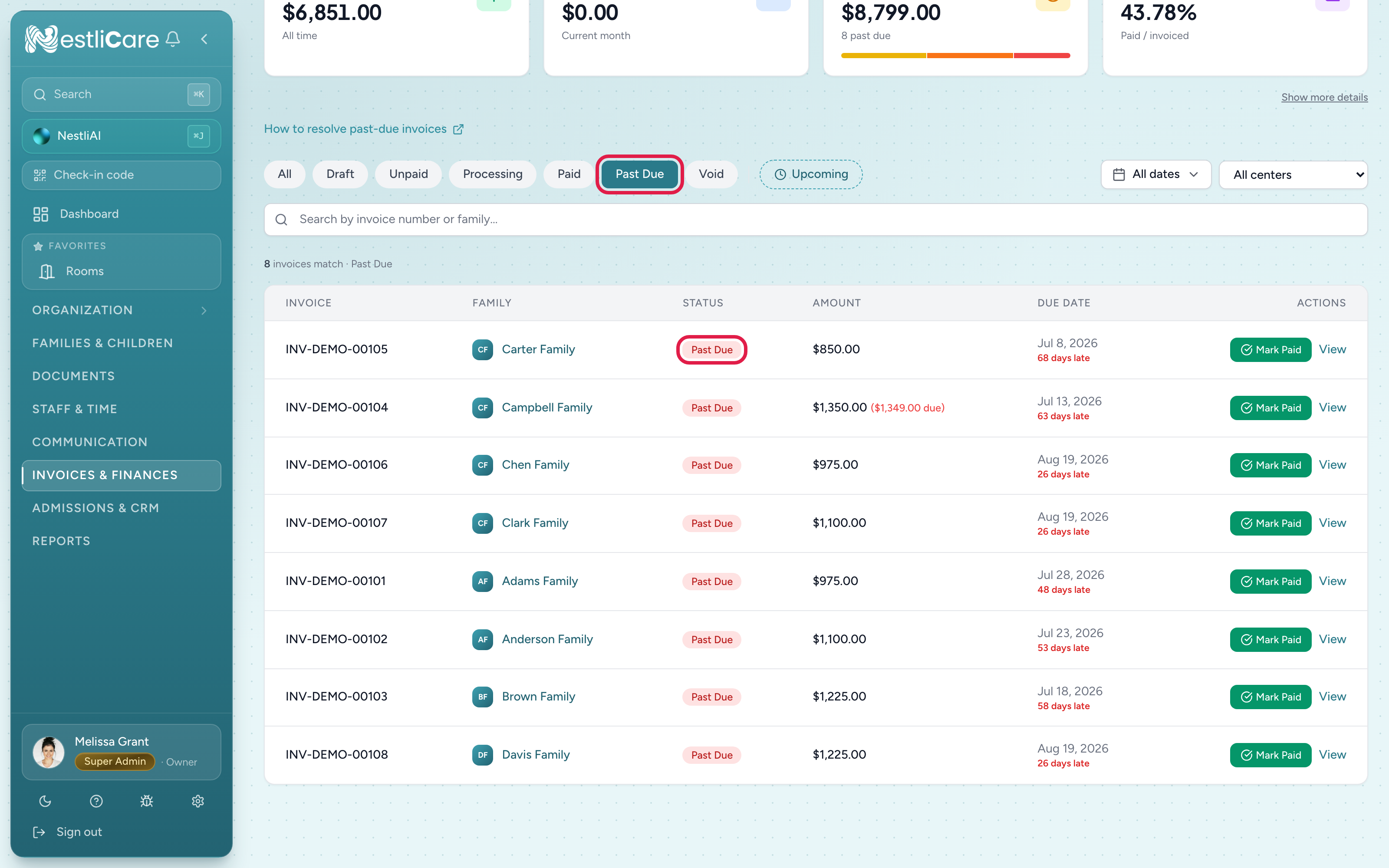
- 1Invoices & Finances → Invoices: the Past Due tab lists every invoice still owing after its due date
- 2An invoice whose payment failed stays Unpaid, or moves to Past Due, with the balance still owing
An invoice becomes Past Due the day after its due date, on your organization's own calendar. The due date is set when the invoice is created: for automatic invoices, it's the generation date plus your Due After (days) setting (15 by default).
NestliCare doesn't email the parent when a card is declined. That's deliberate: some failures clear up on their own, and auto-pay retries cards (see below).
What the parent does
The parent pays again in the NestliCare app, or by signing in at nestlicare.com, with the same card or a new one. Invoice emails never contain a payment link, so there's no old link to resend.
To nudge them, the owner can open the invoice and tap Send reminder. The family gets a push and a bell notification saying how much is due and to open the app to pay. You can send one reminder per invoice per hour.
How auto-pay retries work
If the family has auto-pay on, what happens next depends on how they pay.
Cards. NestliCare tries again every morning at 6 AM UTC. After 2 failed attempts on the same invoice, it stops. The parent gets an in-app notice, "Auto-pay attempts stopped", asking them to update their payment method. You and your other admins get "Auto-pay stopped for a family" with the invoice number. These notices are in the bell only, with no push or email.
Bank payments (ACH). A failed bank payment is not retried: each failed bank debit costs your daycare a return fee of about $4, so auto-pay gets one attempt per invoice. Beyond that:
- If the bank says the account is closed or invalid, the family's auto-pay is paused.
- If bank auto-pay fails on 2 invoices in a row, the family's auto-pay is paused too.
- When auto-pay is paused, the parent has to add a working payment method and turn auto-pay back on.
- If a parent paid by bank themselves (not auto-pay) and it bounces, they get an in-app notice, "Bank payment didn't go through".
- Auto-pay may hold a bank charge for a day if the account balance looks too low. The parent is told, and it tries again soon.
After auto-pay stops on an invoice, it won't charge that invoice again. The parent has to pay it in the app. Their future invoices are still charged by auto-pay as normal, unless auto-pay was paused.
You can see a family's auto-pay status on their account page under Invoices & Finances → Accounts: On, Paused, or Off. Admins can't switch it on for a family, but you can click Suggest auto-pay to ask them.
If the family paid another way
If they paid you in cash, by check, or another way, open the invoice and click Mark as Paid. That also takes it out of any further auto-pay attempts.
When to write it off
If a family leaves and the balance can't be collected, the owner can void the invoice:
- Open the invoice.
- Click Void Invoice in the actions at the bottom of the panel, and confirm.
Voiding marks the invoice as uncollectible and zeroes what the family owes. If the invoice had been sent, the parents are told it was voided by push, bell, and email. The invoice stays in your records under the Void tab of the Invoices page; the All tab no longer shows it.
Void Invoice shows on draft, unpaid, and past-due invoices. It doesn't show on a partly paid invoice.
Troubleshooting
Auto-pay didn't retry. Check the family's auto-pay status on their account page. Paused or Off means nothing will run. If it's On, the invoice may already have hit the 2-attempt limit for cards, or it was a bank payment, which is never retried. Ask the parent to pay it in the app.
I can't see why the payment failed. The Invoices page doesn't show the bank's or card issuer's reason. Ask the parent to try again in the app. A different card usually fixes it.
Multiple invoices showing past due after we already talked to the family. A payment only clears the invoice it was made on. If the family paid $500 but has two $250 invoices, the second one stays owing until they pay it too, or you use Mark as Paid on it if they paid you directly.
The same card keeps getting declined. The card issuer is refusing it. Ask the family to use a different card. Bank payments are another option, but they aren't retried if they fail, and each bounce costs you a return fee.
Related: A family is behind on payment, Charge a late fee, Create and send an invoice.