
Move your data over
Upload your roster, staff list, and records from your old system or paper, then set it up with NestliAI or let our team do it. Free.
You don't have to retype a year of records to move to NestliCare. Upload what you already have, and your families, children, and staff get set up for you. This is free for every daycare, no matter how many children you have.
Only the owner sees this. It lives in Settings → Data Migration, and the tab is hidden from center admins.
Two ways to bring your data over
Go to Settings → Data Migration. You can also click Migrate your data with NestliAI (or Or bring your data across) on the checklist on your dashboard.
Daycares in the United States and Canada see two choices. Everywhere else you'll see the team option only.
Set it up now with NestliAI (usually minutes)
- Click Set it up now with NestliAI and upload your files.
- NestliAI reads them and asks a couple of quick questions if anything is unclear.
- It shows you exactly which families, children, and staff it will create. Nothing is saved until you approve it.
- No emails go to parents. Invite them yourself when you're ready.
Send your files to our team (usually 24 to 48 hours)
- Click Send your files to our team (or, outside the US and Canada, Click to upload files under Import Data).
- Upload your files. Someone on our team sets everything up by hand. Your files are not sent to any AI.
- While we work, your dashboard shows a card saying your daycare is being set up and when it should be ready.
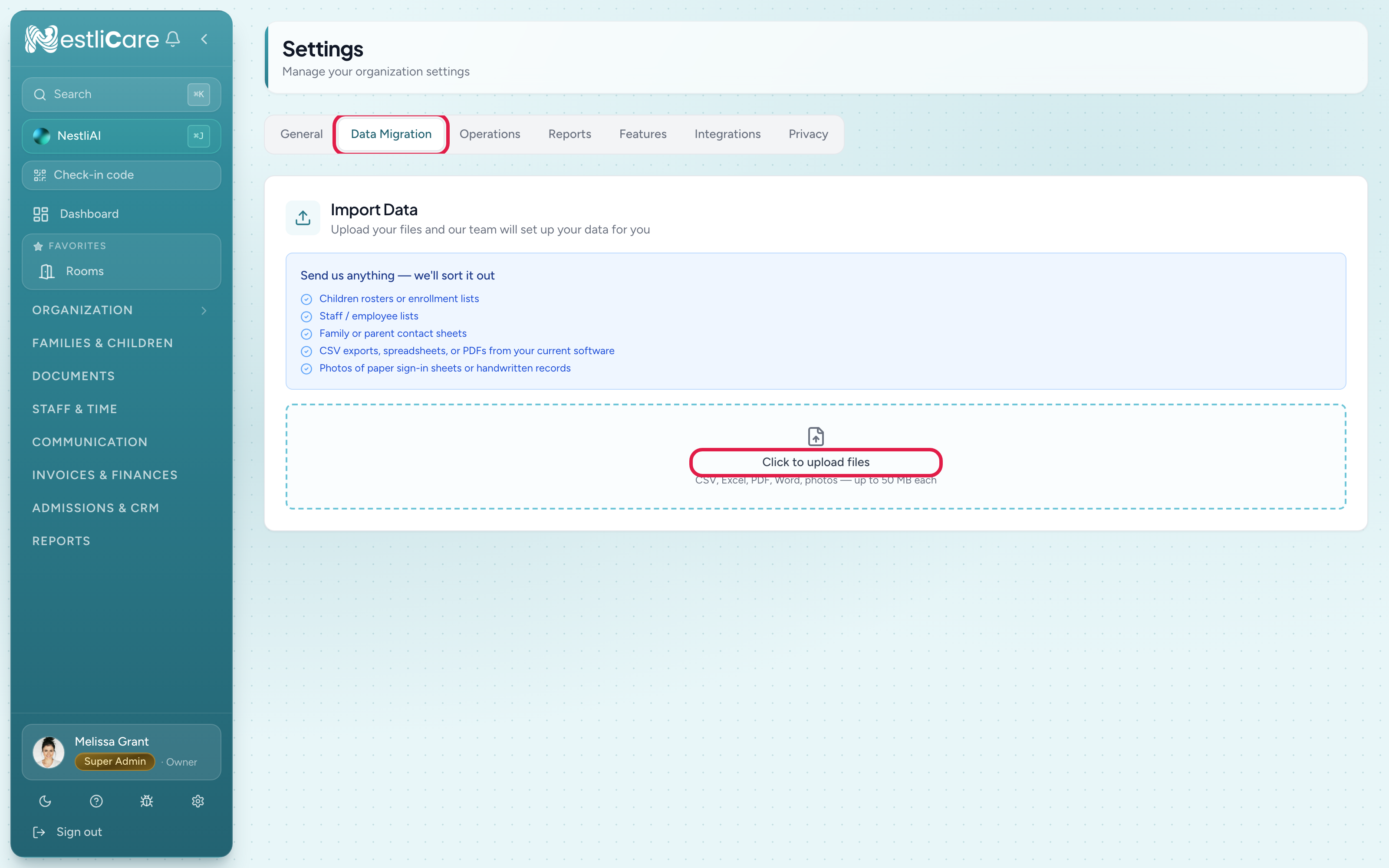
What you can send
Send whatever you have. You do not need to clean it up or fit it to a template first.
- Children rosters or enrollment lists
- Staff or employee lists
- Family or parent contact sheets
- CSV exports, spreadsheets, or PDFs from your current software
- Photos of paper sign-in sheets or handwritten records
Files can be CSV, Excel, PDF, or photos (JPG or PNG), up to 50 MB each. Save Word documents as PDF first.
What comes over, and what doesn't
The migration sets up the data that runs your daycare day to day:
- Families, parents, and children with their contact details
- Staff and their roles
- Room placement so children land in the right room
A few things can't come over, and that's normal:
- Saved card and bank details never transfer between systems. This is a security rule that applies to every platform, not just us. Parents re-enter their payment method once on their first invoice, which takes under a minute.
- Historical attendance, photos, and old messages aren't migrated. Keep your old system open for reference, or export those records once before you close your account.
After your data lands
Once your families and children are in, finish setting up:
- Set up billing so you can send invoices.
- Invite your team so teachers can log in.
- Invite parents to the app from each family card. Nothing is emailed to them during the migration.
Want help planning the whole switch?
The migration covers the data itself. If you'd like a hand planning the full move (timing, what to tell parents, aligning with your billing cycle), email [email protected] with your current software name and how many children you have. We'll plan it with you. Also free. See Switching from other software for the full playbook.