
Use the Data Health dashboard
Spot missing check-outs, unclosed time entries, unnotified incidents, and invoice gaps before they become compliance problems.
Data Health is the meta-report. It doesn't show you operational numbers. It shows you where your records have holes. Run it weekly so small issues don't pile up before a licensing visit.
Run it
- Go to Reports and pick Data Health. It's the first report under Attendance & Safety.
- Pick a center (or all centers) and a date range (default: last 30 days).
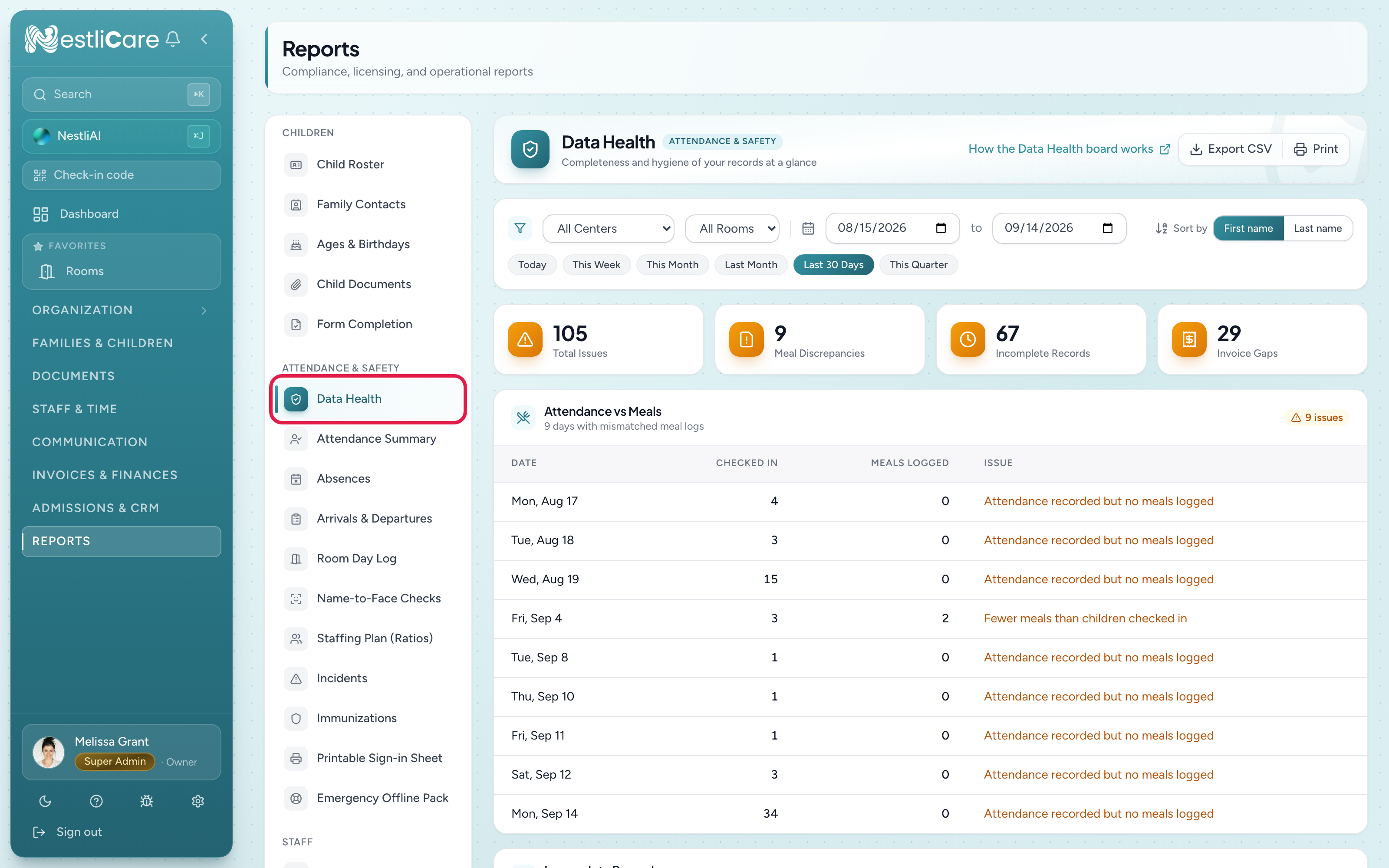
Four cards sit across the top: Total Issues, Meal Discrepancies, Incomplete Records, and Invoice Gaps. Below them are three sections.
Attendance vs Meals
For each day, children checked in compared with meals logged. A day shows up when:
- Meals logged but no attendance: a meal was logged for a child who wasn't checked in. Usually someone forgot the check-in.
- Attendance recorded but no meals logged: children were here but no meals were logged.
- Fewer meals than children checked in: common at snack time when only some children ate.
Incomplete Records
Three checks, each with a count. A count above 0 shows in amber with a Fix link that opens the page where you fix it, already narrowed to your dates:
- Missing Check-Outs: children checked in but never checked out. Fix opens the attendance board on the last day of the range; use the day arrows for earlier days.
- Open Time Entries: staff who clocked in and never clocked out. Fix opens Timesheets for that pay period. Shifts still open at midnight are closed automatically at 11:59 PM (the center's time) and no longer count here, but check those hours too.
- Unnotified Incidents: incident reports where the parent hasn't been notified and the report isn't Closed. Fix opens the Incidents list filtered to them; open each and click Notify Parent.
Invoice Gaps
Families with active enrollments but no invoice in the period. Usually a billing plan hasn't been assigned yet, or a family was skipped. Worth checking each one.
Common use cases
Weekly check
Many centers run Data Health every Friday afternoon:
- Set the range to this week.
- Work down the sections: fix missing check-outs, close open time entries, notify parents on incidents, and sort out invoice gaps.
- You start Monday with clean records.
Before a licensing visit
- Set the range to the past 30 days.
- Get every count to 0.
- Print the page if you'd like to show the inspector your records are clean.
After hiring new staff
New teachers often forget to clock out in their first week. Run Data Health for their center and dates to catch it while you can still remember the real times.
Export and notes
The usual Export CSV and Print buttons are at the top. Data Health doesn't take notes (annotations); fix the records instead.
Troubleshooting
Data Health shows zero issues across the board. Your records may really be clean, or the date range is very short. Try 30 days.
Attendance vs Meals shows issues but I know meals match. Times may be landing on the wrong day. Check the center's time zone (Organization → Centers, edit the center). If it's blank, the organization's under Settings → General is used.
Unnotified Incidents isn't going down. Open each report from Families & Children → Incidents and click Notify Parent. Closing the report also removes it from this count.
The dashboard is slow to load. Data Health runs several cross-checks. A shorter date range loads faster.