
Check staff-to-child ratios
Three views of ratio. Room Overview for right now, the Room Day Log for any day, and the Staffing Plan report for how many staff each room's full roster needs.
"Are we in ratio?" has three different answers, and NestliCare has a screen for each:
- Right now — Room Overview on the dashboard. Every room card shows children here vs staff clocked in, and turns red the moment a room goes over. This is the live number, and it follows room moves for both children and staff.
- On a given day, minute by minute — the Room Day Log report. Who was in each room and when, and the ratio between every arrival, departure and move. This is what to hand an inspector who asks about last Tuesday.
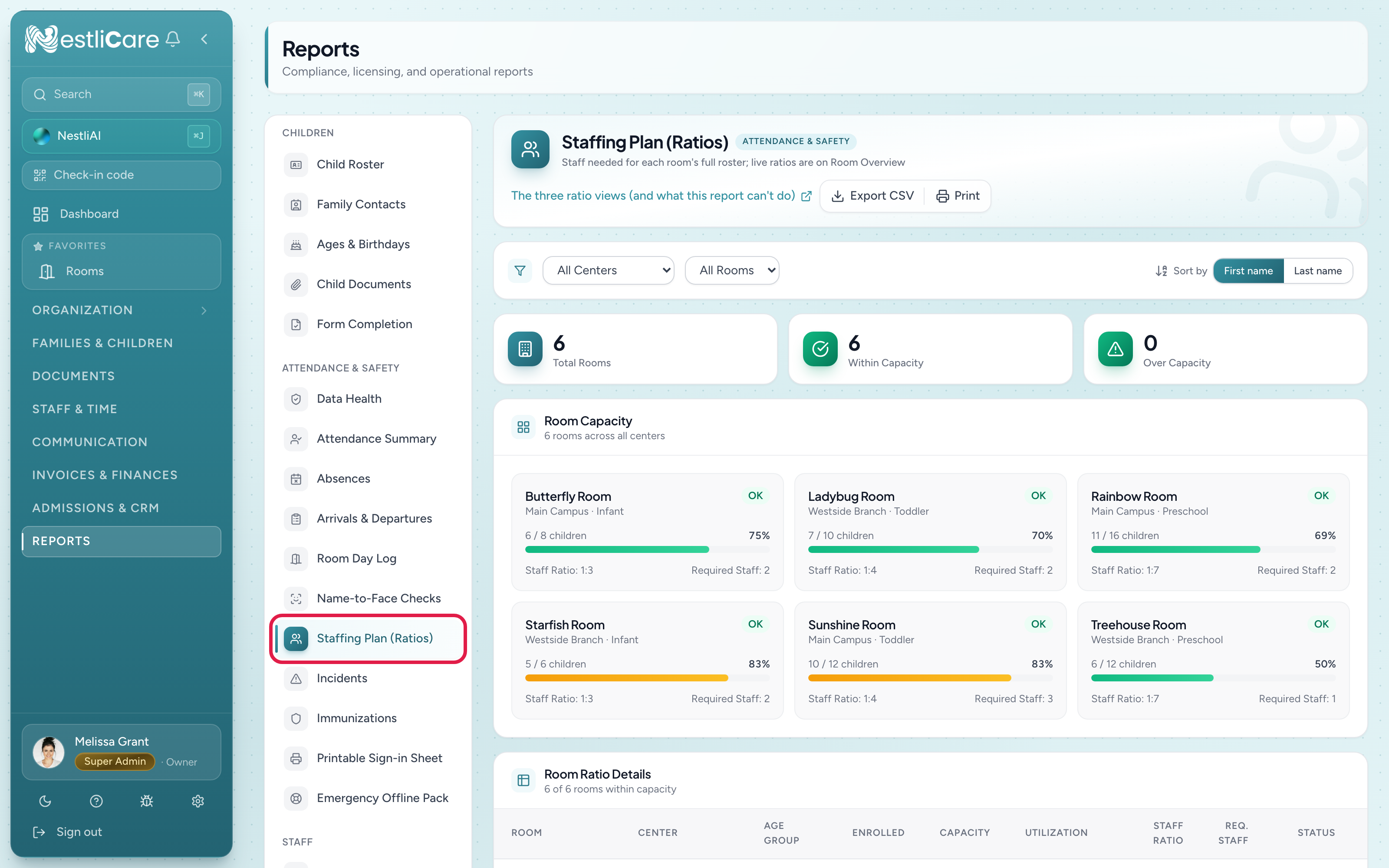
- How many staff each room needs for its full roster — the Staffing Plan (Ratios) report, described below. It counts enrolled children, not who is present, so it is a planning number, not a compliance one.
The Staffing Plan (Ratios) report
A current-state snapshot — no date filter. For each room: how many children are enrolled, what your licensed capacity is, and how many staff you would need on duty to meet your state's ratio if every enrolled child came in.
- Go to Reports and pick Staffing Plan (Ratios) under Attendance & Safety.
- Optionally filter by center (no date range — always current).
What the math is
For each room:
- Capacity — the licensed max, from the room setup (see Add a room)
- Enrolled — count of active enrollments right now
- Staff Ratio — e.g., 1:4 means one teacher per four children. Set on the room
- Required Staff (Req. Staff in the table) — enrolled children divided by the ratio, rounded up. If you have 14 kids in a 1:4 room, you need 4 teachers (14/4 = 3.5 → rounded up)
- Within Capacity — Enrolled ≤ Capacity
What to actually do with this
Daily — use Room Overview, not this report
For a quick check before opening or mid-morning, look at Room Overview on your dashboard. It shows who is actually here. This report only knows who is enrolled.
Before a licensing inspection
- Click each over-capacity room (red bar). Either move a child to another room or document a waiver.
- Cross-check Required Staff against who's actually clocked in (Room Overview shows this live).
- For the day itself, print the Room Day Log; many inspectors want the per-room timeline, not the plan.
When hiring decisions are tight
Export CSV, drop it into a spreadsheet, and model "if I lose teacher X, which rooms break?" before approving time-off or cutting shifts.
What "missing staff ratio" means
If you set up a room without a staff ratio (left the field at 0 or blank), Required Staff shows 0. That doesn't mean the room needs no staff; it means the room can't tell you. Go fix it — edit the room under Organization → Rooms and set its staff ratio. Every state has a required ratio; your room should too.
Export and print
- Export CSV — a spreadsheet of the report's rows, one per room.
- Print — full report prints cleanly on letter-size; the per-room cards reflow to fit.
Annotations
Notes at the bottom are kept for the current month. Useful for "Room 4 has a parent observing today, 2 staff + observer = 3 adults effectively."
Troubleshooting
"Required Staff" shows 0 for a room that has children. The room's Staff Ratio is 0 or blank. Set it on the room under Organization → Rooms.
Report says over-capacity but our center just had a new child enrolled this morning — it's not red yet. Reports refresh on page load. Hard-refresh (Cmd+R) to re-query.
Live staff count doesn't match Required Staff. This report counts enrolled children, not children currently present. For live-in-the-room math, use Room Overview on your dashboard, which shows who's actually here right now.
Room is green on capacity but I'm worried we're understaffed. Capacity is about enrollment, not staffing. Compare Required Staff to who's actually clocked in. The report doesn't know who's on break — you do.
Multi-site org, ratios look fine at one center but wrong at another. Filter to the problem center to see only its rooms. "All centers" view can hide a single over-capacity room.