
Log a nap
Record when a child fell asleep and woke up, or start a nap now and finish it when they wake, so parents see daily sleep.
Nap times add up fast. For parents trying to work out why their toddler is cranky at 5 PM, seeing "45-minute nap" versus "2-hour nap" is often the answer. You can log a nap after the child wakes, or start it when they fall asleep and finish it later.
Log a nap after the child wakes
- Open the Dashboard tab.
- Tap Log Activity. It's one of the four tiles under the Quick log bar.
- Tap the Nap tile in the activity-type grid.
- Tap the room pill, then the child's avatar (or several children for a whole-room nap).
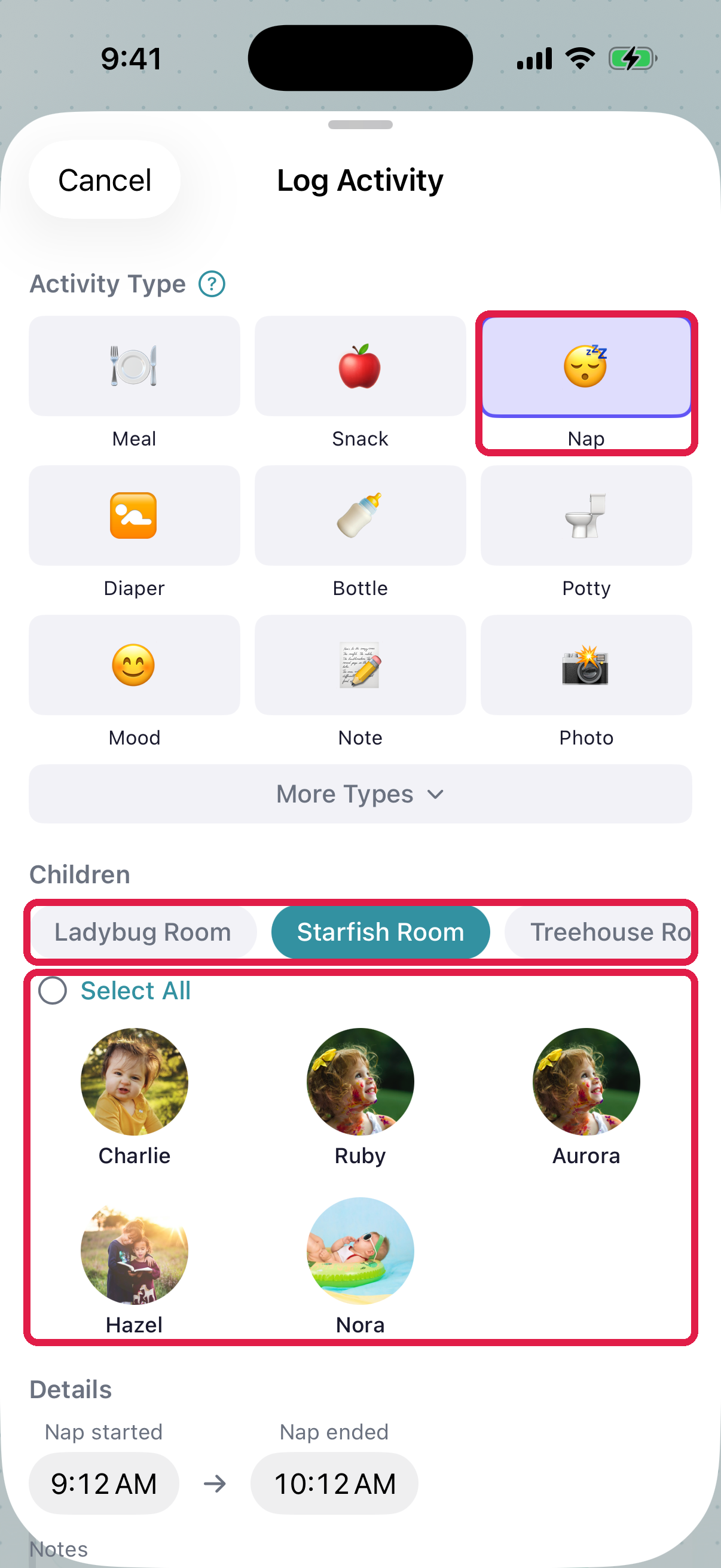
- 1Tap Nap in the activity-type grid
- 2Room pills — pick your room to filter children
- 3Children — tap the child who napped (or several for a whole-room nap)
- Scroll down and set the two times: when the child fell asleep and when they woke up. They start at "an hour ago" and "now", so a nap that just ended usually needs only a small change.
- Tap Save Activity.
NestliCare works out the length for you ("Napped 1h 30m") and shows parents both times.
Start a nap now, finish it later
Use this when a child goes down and you don't want to remember the time until they wake.
- Follow steps 1 to 4 above.
- Turn on Still asleep. The wake-up time disappears and the start time moves to now. Change it if the child fell asleep a few minutes ago.
- Tap Start Nap (Start nap in Room Mode).
The care board opens with the child at the top, shown as sleeping with a timer. (On the phone, an Open care board link also shows under Still asleep.) When they wake, open the care board and tap Woke up, or at… to pick the time they actually woke. The nap is saved then, with both times, and it reaches parents' feeds like any other nap.
While the child is asleep, parents see that their child is sleeping on their Home tab. It goes away when you tap Woke up. If nobody does, it also stops once the child is checked out, at the end of the day, or after 6 hours, so a forgotten Woke up never tells a parent their child has been asleep all day. The care board still shows the nap as "Forgot Woke up?" so you can finish it.
Notes and photos aren't saved with a nap that's still going, so the phone apps hide those fields while Still asleep is on. Add them when you log something else, or edit the nap after it's saved.
Log naps for the whole room
Most teachers wait for the room to wake up, then log each child's nap in one pass:
- On the Log Activity screen with Nap selected, tap several child avatars (or Select All).
- Set times that fit everyone (or log the outliers on their own afterward).
- Tap Log for N Children.
Or, when the room goes down, open the care board, tap Nap time…, pick the children and tap Start nap for N. Tap Woke up for each child as they wake.
Fix a mistake
- Open the Home tab.
- Find the nap card and tap the pencil.
- Change the times or notes, and save.
See Edit or delete an activity.
Started a nap that didn't happen? On the care board, tap Remove (the ×), then Remove nap. Nothing is saved.
Troubleshooting
Child skipped nap. Don't log a nap. Add a Note activity instead: "Zoë skipped nap today, was wide awake but calm." Parents appreciate a clear note more than a zero-minute nap.
"Nap ended before it started." The wake-up time is earlier than the start time. Fix whichever time is wrong.
A child still shows as sleeping on the care board after you logged their nap. The nap you logged ended before they were marked asleep, for example a morning nap you logged later. Tap Woke up on the care board for the current nap.
Parent says the nap didn't appear. The entry is waiting for admin approval (some daycares require it; an admin can check Communication → Feed → Pending on the web dashboard), Share with Parents was off on the entry, or the nap is still going. A nap started with Still asleep reaches parents only when someone taps Woke up.
Multiple naps in one day. Log each one as its own Nap activity. Parents see two entries, each with its own times.