What needs your attention today
The staff dashboard opens with the things to look at before the room settles, like who isn't here yet, allergies, health checks and your own items.
The staff dashboard starts with a short "Needs your attention" list for the room you have open. It is built from records your daycare already keeps, so it shows nothing you did not enter, and sections your daycare does not use are simply not there.
What can appear
- Not here yet. After your daycare's morning time (10:00 AM unless your director changed it), children due in today who haven't been checked in or marked absent. Check them in or mark them absent and they leave the list. If most of the morning isn't recorded yet, it says Check-ins look behind today instead of listing everyone. If your daycare asks families too, you'll see family asked at with the time. See Notice children who haven't arrived.
- Watching for an illness. When your director has sent the room's families an illness notice, you'll see which illness and until when to keep an eye out. The notice never names who was ill, so please don't either. See Send an illness notice.
- Allergies and conditions. Every child in the room with an allergy, medical condition, medication or dietary restriction on file, children who are here today first. Tap to see the details. This is the card to read before snack.
- Health checks. Children here today who have not had their daily health check. Only shown if your daycare does daily health checks.
- Expiring soon. Immunization records and child documents that expire in the next 30 days, or already have.
- Photo consent. Children here today without photo consent on file, only where the law makes consent a requirement.
- Medication. Medication requests from families waiting for review, and scheduled doses still to give today for children who are here. Only shown when a child in the room has a medication request. On Android, medication requests also have their own Medication requests row just below this section. See Review medication requests and log doses.
- Your own items. One card at the end for things that are about you rather than the room: documents waiting for your acknowledgment, inductions in progress, training hours still needed this year, and leave requests awaiting approval. Tap it to open the list; each line takes you to the right page.
When none of these apply, the section says so in one line.
Screenshot pendingThe Needs your attention section at the top of the staff dashboard, with the allergies card and the teacher's own items card
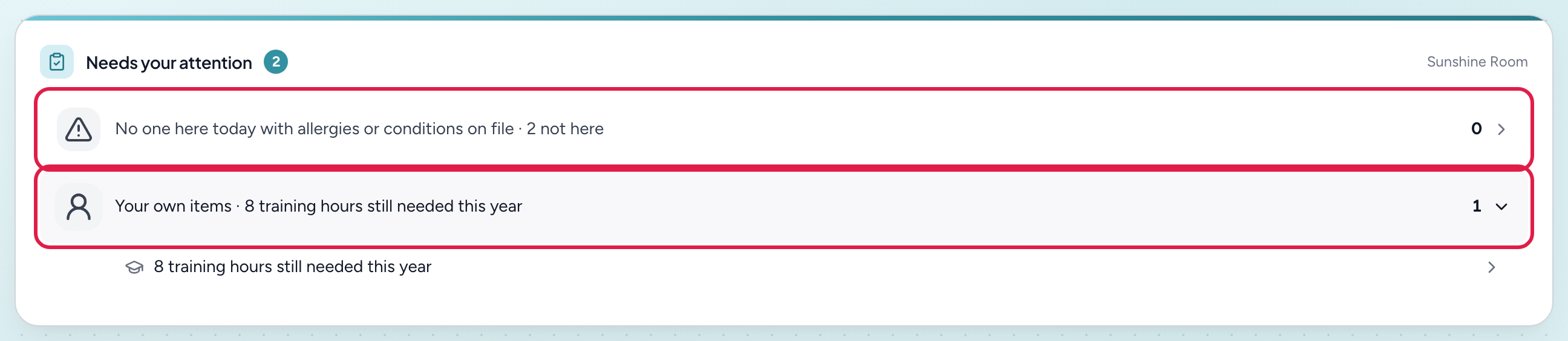
- 1A room card — one line with a count; tap to open the list
- 2Your own items — documents, inductions, training hours and leave that are about you, not the room
Looking for log counts or birthdays?
To see when each child last had a diaper, bottle or nap, use the care board. Your room's birthdays show at the top of the Home tab.
Notes
- The list refreshes when you switch rooms or pull to refresh. The section itself never sends a notification and it is not a compliance record; it is a glance.
Related
Related articles
Edit or delete an activity after it's posted
Fix the details, note or time on a logged activity, or remove it from the feed.
Log a diaper change
Record a diaper change (wet, BM, dry or cream) for one child or several, so parents see it in their app.
Log a meal
Record what children ate and how much, for parents' feed and your CACFP records. Add photos if you like.
Log a nap
Record when a child fell asleep and woke up, or start a nap now and finish it when they wake, so parents see daily sleep.
Was this article helpful?