
Edit center details and licensing info
Update a center's name, capacity, license, operating hours, or address after it's been created.
Once a center exists, you can change its name, contact details, license, capacity, timezone, operating hours and address from its edit form.
Edit a center
- Go to Organization → Centers.
- Click the pencil (Edit center) on the center's card. You can also open the center and click Edit.
- Change what you need, then click Save Changes. You go back to the center's page, and changes take effect right away.
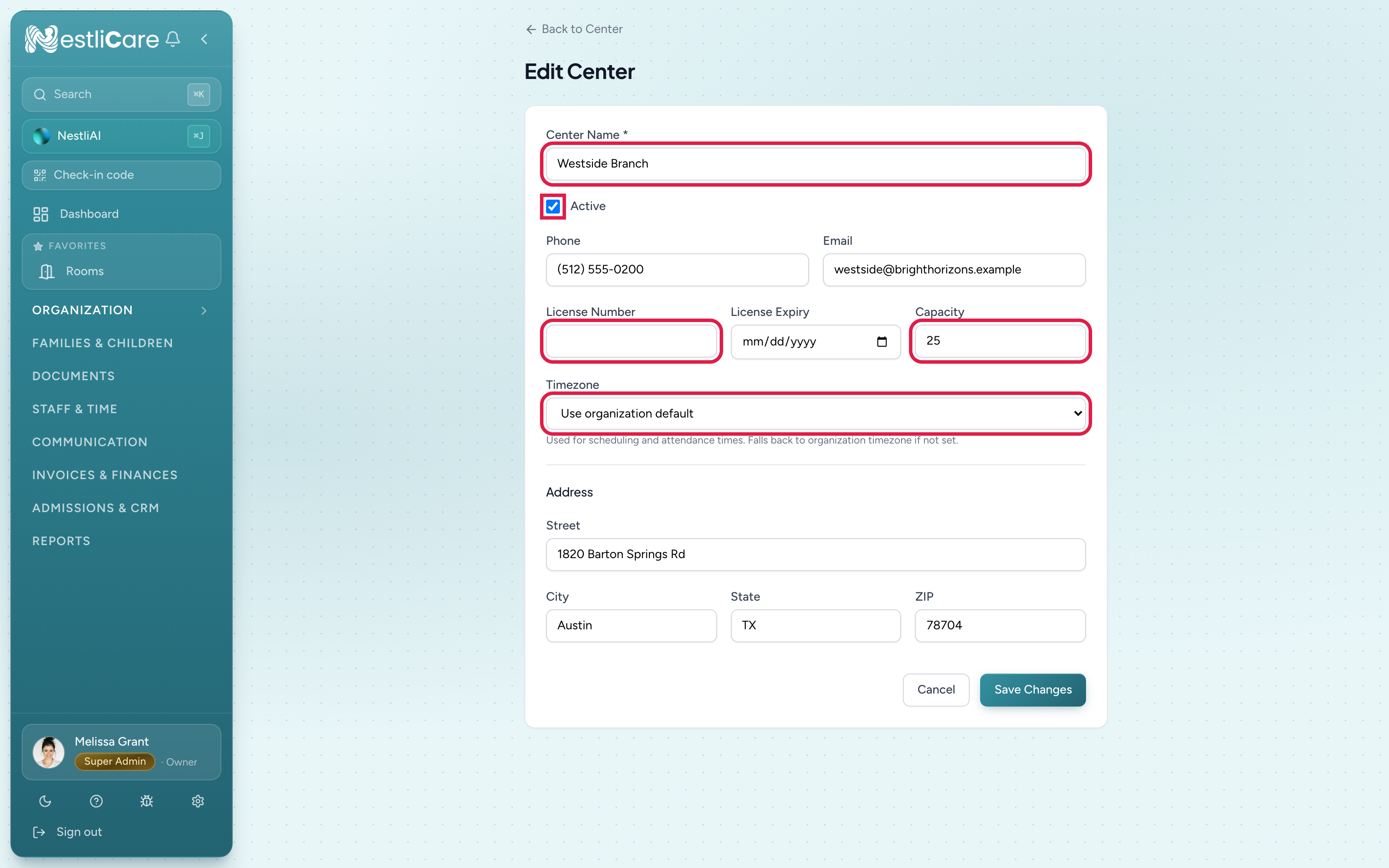
- 1Center name, phone, email: edit freely
- 2License Number and License Expiry: update at renewal. The license chip on the center's card turns amber 60 days before expiry and red after it
- 3Capacity: only change when your actual licensed maximum changes
- 4Active: unticking it archives the center (owners only). See Archive or delete a center
- 5Timezone and address: edit as needed
Set your operating hours
Operating hours live on the same edit form, between the timezone and the address.
- Go to Organization → Centers and click the pencil on the center's card.
- Under Operating hours, enter an opening and a closing time for each day you are open.
- Tick Closed for days you are not open, or leave a day blank to keep it off your public page entirely.
- Fill in Monday and click Copy Monday to the rest of the week if the other days are the same.
- Click Save Changes.
Times are in the center's timezone. The hours show up in three places:
- Your public enrollment page (Admissions & CRM → Enroll Page → Hosted Page), as long as Show Operating Hours is switched on there. That switch only controls whether the section appears. The hours themselves come from the center.
- The parent app, under the center's details on the parent's account screen.
- Staff scheduling and attendance, where the day's hours prefill new shifts and set the time used when a forgotten check-out is closed automatically at the end of the day.
When to update license info
When your childcare license renews:
- Update License Number if the new license has a different number.
- Update License Expiry to the new expiration date.
- Click Save Changes.
The license chip on the center's card turns amber 60 days before the expiry date and red once it has passed. NestliCare does not send renewal reminders, so keep your own.
Archive or delete a center
Archiving and deleting are owner-only. Unticking Active on this form archives the center, the same as the archive button on its card. See Archive or delete a center.
Multi-center orgs
If you have several centers, the Center picker on the admin dashboard switches which center you're viewing. Admins assigned to one center see the picker locked to their center. Archived centers are left out of the picker.
Troubleshooting
"You can only manage the center you are assigned to." You're a center admin for a different center. The edit pencil only shows on your own center. Ask an owner to make the change.
"Only owners can archive or restore centers." You unticked Active as a center admin. Tick it again to save your other changes, or ask an owner to archive the center.
I changed the timezone and old times look different. Times are stored as exact moments and always shown in the center's current timezone. Changing the timezone changes how every time is shown, past and future. If times were typed in while the timezone was wrong, those entries stay off by the difference. Set the timezone correctly as early as you can.
Turned on Show Operating Hours on the public page but nothing appears. The public page only lists days that have hours. Add them on the center's edit form (above) and the section appears on the next page load.
Can't find where to upload a logo. The center edit form has no logo field. Your logo goes on your hosted enrollment page: Admissions & CRM → Enroll Page → Hosted Page → Branding → Upload logo, then Save Hosted Page. See Update your organization's profile.