
Set up the care board
Choose which rooms show the care board, which columns it shows (diaper, toilet, bottle, photos today) and optional reminder colours.
The care board shows teachers, for every child in a room, how long it has been since their last diaper change, bottle and nap, and who is asleep right now. It replaces the whiteboard many baby and toddler rooms keep on the wall. Teachers use it on a Room Mode tablet, on their phone, or on the web. See Use the care board for what teachers see.
It works without any setup. This article covers the three things you can change per room: which version of the board it gets, which columns it shows, and optional reminder colours.
Which rooms get it
Each room has one of three boards:
- Full board: the columns you pick (diaper and bottle unless you change them) plus nap.
- Naps only: just the nap column. Rooms where children still nap but aren't in diapers.
- Off: no board.
Out of the box every room is on Automatic, which picks for you:
- Full board if the room's age range tops out at 3 years or younger, a diaper or bottle was logged in the room in the last 14 days, or most children in the room are under 3.
- Naps only if the room's age range tops out at 6 or younger, a nap was logged in the last 14 days, or most children are under 6.
- Off otherwise, for example a school-age room.
Most children are in diapers until somewhere between 2 and 3½, so toddler rooms get the full board too, not just baby rooms.
The Bottle column only shows in rooms that logged a bottle in the last 14 days or have a child under 12 months.
Open the board on the web
- Sign in at
https://nestlicare.comas a super admin or center admin. - Open Organization → Care Board in the menu.
- Pick the room from the drop-down in the top right. Rooms where someone is asleep say so, for example "0-18mo · 1 asleep".
On the iPhone and Android apps (7.0 and later), the Care board card on your Dashboard lists the same rooms.
Change a room's board
- With the room open, click the sliders button at the top right of the board (Care board settings).
- Under Show the care board for this room, choose:
- Automatic: shows what Automatic would pick for this room right now.
- Full board: pick the columns
- Naps only
- Off
- Click Save.
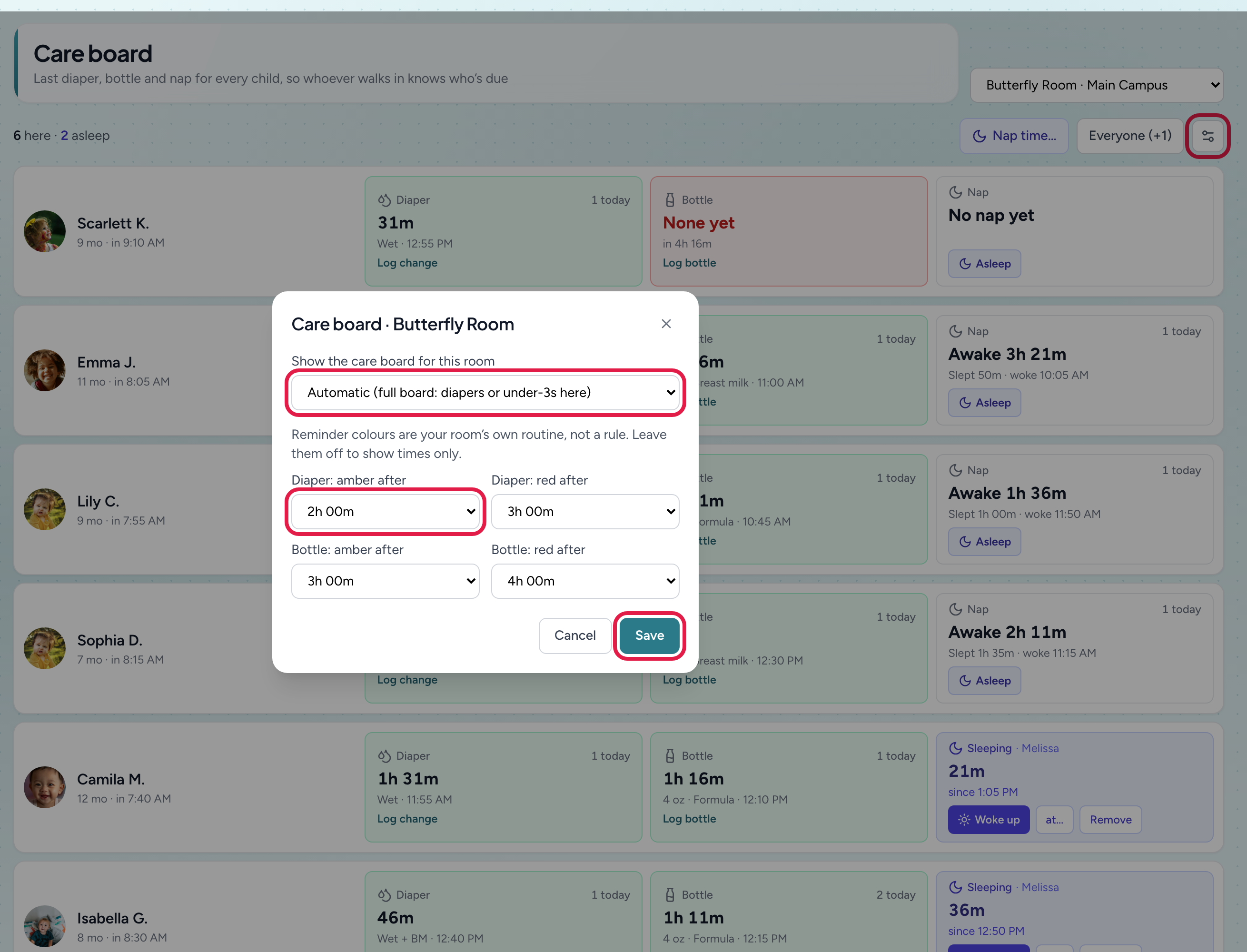
- 1Care board settings (the sliders button)
- 2Which board this room shows
- 3Reminder colours: amber, then red, after these times
- 4Save applies to every device in the room
The change applies to every device straight away: the Room Mode tablet, teachers' phones and the web.
Pick the columns
A full board shows Nap for every room, plus the columns you tick. Swap them to match what your room actually tracks:
- Diaper: time since the last diaper change (potty trips count too).
- Toilet: time since the last toilet trip, for potty-training rooms. Teachers log a trip with one tap: Pee, BM, Pee + BM, Dry or Accident.
- Bottle: time since the last bottle.
- Photos today: how many photos each child's family has received today, so teachers can spot who hasn't had one yet. Photos are still taken from Log Activity; this column only counts them. Entries not shared with parents don't count.
- Open the room and click the sliders button (Care board settings).
- Choose Full board (or leave it on Automatic if Automatic picks the full board).
- Under Columns, tick the ones you want. For a potty-training room, untick Diaper and tick Toilet.
- Click Save.
Until you tick columns yourself, the board shows Diaper, plus Bottle in rooms that use bottles.
Snack or lunch for the whole table? That's faster from Room Mode's Log activity tab: pick Snack or Meal, tap Select all present, and save once for everyone, instead of tapping each child on the board.
Set reminder colours
Reminder colours are off until you turn them on. When they're on, a child's box turns amber once it has been a set time since their last diaper change, toilet trip or bottle, and red after a longer time. The times are your room's routine, not a rule, so you choose them per room.
-
Open the room and click the sliders button (Care board settings).
-
Pick times for any of:
- Diaper: amber after and Diaper: red after
- Toilet: amber after and Toilet: red after, for example every 90 minutes for a potty-training routine
- Bottle: amber after and Bottle: red after
You only see times for the columns the board shows.
-
Click Save.
Amber has to be shorter than red. Pick No colour to turn a colour off again. A legend (OK, Due soon, Overdue) appears under the board once any colour is set.
Reminder colours are only for the full board. A nap-only board shows times without colours.
Set a sleep check routine
Teachers can record a sleep check on any sleeping child: when they looked, how the child was lying (Back, Side or Tummy) and who checked. To have the board remind them, set your room's routine:
- Open the room and click the sliders button (Care board settings).
- Under Sleep checks: mark due every, pick 5, 10, 15, 20, 30, 45 or 60 minutes. No reminder (times only) keeps checks without a reminder.
- Click Save.
A sleeping child's box gets an amber ring and "check due" once that long has passed since their last check, or since they fell asleep. It works on the full board and the nap-only board. Every check is listed by nap in Reports → Attendance & Safety → Sleep Checks, with the longest gap between checks, positions and who checked, ready to print or export for licensing. See Use the care board for what teachers tap.
Good to know
- Parents never see the care board. They see each diaper change, bottle and nap in their feed, as they always have. A nap started with Asleep reaches parents only when a teacher taps Woke up.
- Nothing extra to keep up to date. The board is built from the entries teachers already log, whichever way they log them: from the board, Log Activity, Quick log or Room Mode.
- Room Mode tablets show the board as a Care board tab. See Set up Room Mode.
- Phone and tablet apps need NestliCare 6.3 or later.
Troubleshooting
A child is still asleep in a room whose board is off. The room shows a nap-only board until that nap is ended, so someone can tap Woke up (or Remove). This happens when a nap is started with Still asleep in a room without a board.
A room has no Care board tab in Room Mode. The room is set to Off, or Automatic picked Off (for example, a new room with no age range and no entries yet). Open the room on the web and choose Full board or Naps only.
A toddler room only shows naps. Set it to Full board, or add the room's age range (for example up to 36 months) under Rooms. See Add a room.
The Bottle column is missing. Unless you picked the columns yourself, it only shows in rooms that used bottles in the last 14 days or have a baby under 12 months. Tick Bottle under Columns to show it anyway.
Teachers still see Diaper after I switched to Toilet. Their phone or tablet app is older than 7.2. Ask them to update the app.
The colours feel wrong for one child. The times are per room, not per child. Pick times that suit most children in the room, and teachers can still see the exact time for everyone.